Changelog
Stay up to date with the latest additions and improvements to Quilia.
Provider Portal Launch and Request Builder Improvements
Version 2026.3.2 introduces a dedicated portal for medical providers, brings a cleaner request builder experience, and delivers deep links in request notifications so your clients get to where they need to go faster.
Provider Portal
Medical providers can now sign up and onboard through their own dedicated portal, separate from your firm's workflow.
- Provider sign-up and onboarding: Providers complete a guided setup flow that walks them through account creation and onboarding — no manual configuration required on your end
- Provider dashboard and metrics: Once onboarded, providers have access to a dashboard with key metrics to track their activity and engagement with your firm
Request Builder Improvements
- Cleaner toolbar and layout: The request builder toolbar has been reorganized for a more intuitive flow, with improved layout and spacing that makes building requests faster
- Renamed send action: The send button has been given clearer labeling to reduce ambiguity about what happens when a request is submitted
Request Notifications
- Deep links in notifications: New request notifications now include a direct link that opens the specific request in the Quilia mobile app, so clients can get straight to what they need without navigating manually
Bug Fixes and Stability
- CaseChat: Fixed an issue where certain participants appeared as "Unknown" in the CaseChat slideout — all users now display their correct names
- Request submissions on mobile: The request submissions table can now be scrolled horizontally on small screens so all columns are accessible regardless of screen size
- Reputation management: NPS survey notification emails were previously being sent to clients as well as staff — this has been corrected so only staff members receive these notifications
- CMS integrations: Webhook subscriptions are now properly disabled when a firm is deactivated, preventing unnecessary background traffic from inactive organizations
- CMS import emails: Fixed an issue causing duplicate notification emails when case imports failed, and improved detection of client party roles to reduce false import errors
- Import notifications: Fixed a bug where staff could receive the same deferred authentication import notification more than once
Attorney Portal v2026.3.2By Andre Hammons
CaseChat Redesign, Reputation Insights, and Document Signing Enhancements
Version 2026.3.1 brings a completely redesigned CaseChat experience, deeper reputation insights, and expanded document signing capabilities that let your firm collect more information from clients without workarounds.
CaseChat Redesign
CaseChat has been rebuilt with a modern, iMessage-style layout that makes client communication feel familiar and effortless.
- Modern messaging interface: The conversation view now uses a familiar chat bubble layout, making it comfortable for both staff and clients to follow conversation threads
- Inline attachments: Images and file attachments display directly in the conversation — no need to open a separate panel to view what was shared
- Lightbox image viewer: Tap any image to open it in a full-screen viewer for a closer look without leaving the conversation
- Improved reliability: Real-time message delivery has been stabilized with added validation, so messages appear consistently without requiring a page refresh
Reputation Insights
Your reputation dashboard now gives you a richer view of how client satisfaction is trending over time.
- Score trend charts: The ratings graph shows NPS and Google review score trends over time, making it easy to see whether satisfaction is improving week over week
- Google review count metrics: Total Google review counts now appear in team member stats and the reputation overview, giving you a complete picture of your online presence
- Auto-fill review links: When you have a connected Google Business Profile, the Google review link field in setup fills in automatically — one less thing to configure
- Filter reviews by client: The reviews list can now be filtered by client, so you can quickly pull up all feedback associated with a specific person
Document Signing Builder Enhancements
Three new field types are available in the document signing builder, letting you collect a wider range of information in your signed documents.
- Text area: Capture longer, multi-line responses from signers — useful for descriptions, explanations, or open-ended questions
- Dropdown select: Present signers with a predefined list of options to choose from, keeping responses consistent and easy to review
- Date/time: Capture dates and times in a structured format, eliminating ambiguity when specific dates matter
Bug Fixes and Stability
- Automation messages: The "Delete All Related" action now correctly removes only messages from the matching automation group, preventing unrelated messages from being deleted
- Password visibility: An eye icon on the sign-in form lets you show or hide your password while typing, reducing sign-in errors from hidden typos
- Case name search: Searching for a case by name now checks all name fields — first, last, middle, and others — so you can find clients regardless of how their name was entered
- Sidebar layout: Fixed an overflow issue in the sidebar that could push action buttons off screen
- Filevine reliability: Filevine webhooks now respond immediately rather than waiting for full processing to complete, eliminating timeout errors during high-volume events
- Zapier imports: Cases created via Zapier now correctly receive phase timestamps and scheduled phase messages, matching the behavior of other integrations
- Import error display: The failed imports table now shows the specific error reason for each failed import, making it easier to diagnose and resolve import issues
Attorney Portal v2026.3.1By Andre Hammons
Redesigned Tab Bar, Welcome Screen, and Extensive UX Polish
Version 2026.3.0 delivers a significantly improved navigation experience, a smoother onboarding flow for new case members, and a wide range of quality-of-life improvements throughout the app — from how tasks are organized on your home screen to how documents are signed and previewed.
Redesigned Tab Bar
- Gradient pill indicator: The bottom navigation bar now features a gradient pill indicator that clearly highlights the active tab at a glance
- Labeled tabs: Each navigation icon now has a label beneath it, so you always know which section you are in without having to guess
Welcome Screen for New Case Members
- Guided first-time experience: New case members now see a welcome screen when they first open the app, helping them understand what to expect before diving in
- Smoother onboarding: The introduction flow is designed to reduce confusion for clients who are new to managing their case through Quilia
Home Screen Improvements
- Task categories: Home screen tasks are now grouped by priority with clear category headers, so clients can see what needs their attention first
- Document request bundling: When your legal team requests multiple documents at once, they now appear as a single grouped task instead of several individual buttons, reducing visual clutter
- Task subtitles: Each task button now includes a short description of what the client is being asked to do, setting expectations before they tap
In-App Document Signing
- Sign without leaving the app: Clients can now sign documents directly within the app using a built-in signature form, removing the need to open an external link or third-party app
PDF Thumbnail Previews
- Identify documents at a glance: PDF files now display a thumbnail preview in file lists and message attachments, making it easy to find the right document before opening it
Wage Loss Improvements
- Simplified employer forms: Employer information screens have been redesigned as flat, single-page forms that are faster and easier to complete
Vehicle Period Tracking
- Rental and loss-of-use periods: Clients can now track vehicle rental periods and loss-of-use periods directly in the app with a dedicated tracking interface
Request Improvements
- Formatted instructions: Requests from your legal team now render rich text properly, including bold, lists, and other formatting for clearer guidance
- Better request list layout: Improved layout and navigation for viewing outstanding requests
Improved Translations
- More complete coverage: An automated translation pipeline now ensures more consistent translations across all 24 supported languages
- Neutral terminology: References to "accident" have been updated to the more neutral "incident" across all supported languages
- Cleaner Spanish UI: Spanish translations have been tightened throughout login, navigation, and form screens to prevent text overflow
- Clearer page names: The "Treatment" page is now called "Health" and the "Documents" page is now called "Files" for more intuitive navigation
Bug Fixes and Stability
- Font scaling: The app now caps font scaling at 1.5x to prevent oversized text from breaking layouts
- Input fields: Fixed floating labels that could overlap the text being typed
- Checkbox alignment: Fixed EULA checkbox and label alignment at larger font sizes
- Select menus: Fixed height scaling issues with dropdown selectors
- Android document signing: Fixed an issue where the keyboard would obscure the signature screen on Android
- Android scroll handling: Fixed keyboard overlay issues in scroll views throughout the app
- Invalid deep links: The app now redirects to the home screen instead of showing an error when an unrecognized link is opened
- Form validation timing: Validation errors now only appear after a form is submitted, rather than while filling it out, reducing distraction
- Doctor filter: Fixed an issue where deleted doctors could still appear in the wage loss verification dropdown
- Provider names: Provider names are now displayed exactly as entered, without automatic capitalization changes
- Browser tab titles: Fixed an issue where the browser tab title would duplicate itself on the home screen in the web app
- Home tasks: Tasks are now correctly hidden when your organization has disabled that feature
- Vehicle period dates: Fixed a timezone issue that caused vehicle period dates to shift by one day when saved
- Back navigation: Fixed a bug where saving an edit would sometimes trigger an extra back navigation step
iOS v2026.3.0Android v2026.3.0By Andre Hammons
Sidebar Redesign, Smarter Case Exports, and Messaging Improvements
Version 2026.3.0 brings a cleaner navigation sidebar, a more informative case export experience, smarter NPS feedback routing, and automated phase messaging that keeps clients informed without manual follow-up.
Navigation Sidebar Redesign
The sidebar has been streamlined to give you more room for case content.
- Fully collapsible: The sidebar now hides completely when collapsed instead of shrinking to an icon-only strip, freeing up more screen space for case content
- Smooth animation: Opening and closing the sidebar uses a polished fade-and-collapse animation for a more refined feel
Case Export Improvements
The export experience on case detail pages is now more informative and easier to use.
- Descriptive export dialog: The export button opens a dialog explaining each available format, replacing a silent dropdown with clear choices:
- Spreadsheet (CSV) — for filtering and sorting in Excel or Google Sheets
- Document (PDF) — a formatted timeline with images for printing or sharing
- AI Summary — a text summary ready to paste into AI assistants
- Case-type-aware AI export: The AI Summary tailors its output to the case type, generating relevant sections for personal injury, trusts and estates, bankruptcy, and family law cases
NPS Notification Routing
NPS score notifications now reach the people closest to each client.
- Notify assigned case members: Feedback notifications go to the staff members assigned to the case instead of a single org-wide email address
- Configurable recipients: A new settings dialog on the reputation page lets you add additional notification addresses beyond the assigned case members
- Smart fallback: If no case members or configured emails are found, notifications fall back to the org email so no feedback is ever lost
Automated Phase Messages
Phase messaging is now handled automatically whenever a case transitions to a new phase.
- Reliable delivery: Phase messages are scheduled automatically on case transitions, so clients receive timely communications without manual follow-up
- Language fallback: When no message template exists for a client's language, the system falls back to the English template so no client is left without a message
Team Management
- Resend invite for all members: The resend invite option is now available for all team members from the action menu — not just those who have never signed in — useful for staff who need a fresh login link
Bug Fixes and Stability
Cases
- Sticky case header: The case detail header and navigation tabs now stay visible at the top of the screen as you scroll, keeping case actions and navigation always within reach
- Fixed case detail crash: A crash on the case detail page caused by empty navigation tab values on mobile has been resolved
- Clearer "Add New Case" language: The add case modal now uses clear, consistent language throughout and the External ID field no longer shows developer-facing descriptions
- Case journal heading: The journal page now shows the correct heading for each case type — such as "Case Notes" or "Claim Journal" — instead of always defaulting to "Case Notes"
- All cases now load: Fixed a silent data truncation issue where large organizations were not seeing all their cases due to database query limits
Messages
- Consistent Auto badge: All automated phase messages — including welcome messages sent on phase transitions — now consistently display the "Auto" badge
Authentication
- Stable token refresh: Fixed a race condition where multiple simultaneous requests with an expired session could each attempt to refresh the token independently; token refresh is now coordinated so only one request runs at a time
CMS Integrations
- Phase selection in status mapping: Fixed a bug where only the "All" option could be selected in the phase status mapping table; individual phases can now be selected and mapped correctly
- SmartAdvocate document sync: Fixed an issue where uploaded documents were missing their original filename in SmartAdvocate; filenames now appear correctly after upload
- SmartAdvocate and Litify phase imports: Fixed duplicate case phases being imported from SmartAdvocate and Litify
- NEOS duplicate contacts: Fixed an issue where related-contact sync in NEOS could create duplicate user records
Client Management
- Phone number matching on import: Fixed phone number deduplication during CMS imports to correctly recognize both local and international phone formats, preventing unnecessary duplicate client records
Attorney Portal v2026.3.0By Andre Hammons
Reputation Management and Document Signing Improvements
Version 2026.2.5 brings a collection of targeted improvements to reputation management and document signing, along with more meaningful team activity reporting.
Reputation Management Enhancements
- Shorter review links: Review SMS messages now use short links to keep messages clean and concise
- Organization name in SMS: Your firm's name is included in outbound review request messages so clients immediately recognize who the message is from
- Track link clicks: Click tracking records whether clients clicked the review link, giving your team insight into campaign performance
- Sent Requests tab: A new paginated Sent Requests tab lets staff browse all outgoing review requests and their status in one place
- Multilingual reviews: Google-translated reviews now render with separate translated and original language sections, making multilingual client feedback easy to read
Document Signing Builder Improvements
- Duplicate fields: Fields in the signing document builder can now be duplicated with one click, speeding up form setup when you need multiple similar fields
- Guided onboarding tour: New users are walked through the builder interface with a step-by-step tour on first use
- Precise field placement: Fields now snap to alignment guides and support drag-and-resize, giving attorneys pixel-accurate control over signature and text field placement
More Accurate Team Activity Tracking
- Last Active based on usage: The Team Settings page now shows "Last Active" based on actual portal usage rather than last sign-in time, giving managers a more meaningful view of team engagement
Bug Fixes and Stability
- Sign-up: Fixed an issue where the sign-up form would hang indefinitely after submission; the form now completes reliably regardless of notification delivery timing
- Organization details: Fixed a bug where saving organization details would overwrite location address fields with blank data
- PDF thumbnails: Fixed thumbnail generation failures; thumbnails now generate reliably for all PDF attachments
- Case status on intake: Fixed a timing issue where cases created through the add-patient flow were not automatically set to open status
- Add new case modal: Fixed a navigation error that could occur when submitting the new case form
- Stripe payment setup: Fixed payment setup completion that was silently failing; the flow now completes correctly via a dedicated API route
- API credential fields: Fixed password managers incorrectly autofilling API credential input fields in integration configuration modals
- Integrations page: Fixed a spacing issue under the integrations toggle button that was causing layout inconsistency
- Integrations button labels: Corrected the CMS integration button label from "Request" to "Enable" for SmartAdvocate and Salesforce
- Reputation management: Fixed the Configure Google button styling to use the correct outline variant
Attorney Portal v2026.2.5By Andre Hammons
In-App Help Chat and PDF Previews
Version 2026.2.4 brings built-in support resources directly into the portal, makes it easier to identify documents at a glance with PDF previews, and adds new tools for managing client communication preferences and online reputation.
In-App Help Chat
- Always-available support: A help chat is now accessible directly within the portal, so your team can get answers to questions about features and workflows without leaving the page
- AI-assisted responses: The chat draws on an integrated knowledge base to provide accurate, context-aware guidance on portal functionality and best practices
PDF Thumbnail Previews
- Inline document previews: PDF files attached to messages and CaseChat conversations now display thumbnail previews, making it easy to identify documents at a glance without opening them
- Consistent across messaging: Thumbnails appear in both client messages and CaseChat conversations for a uniform experience
Case Data Export
- Export as markdown: Attorneys can now export a structured summary of case data as a formatted markdown document, useful for external reporting, case handoffs, or AI-assisted review
Faster Google Review Collection
- Direct review links: SMS review requests now send clients directly to the Google review page, bypassing intermediate redirects for a smoother experience that results in more completed reviews
SMS Opt-Out Support
- Respect client preferences: Clients can now opt out of SMS notifications, with their preferences tracked consistently across all messaging workflows so their communication choices are always honored
Notification Delivery Improvements
- Channel preferences honored: Notification workflows now respect each user's preferred communication channel, ensuring messages arrive the way each user expects
- Google review follow-ups: Review follow-up reminders are now managed through a centralized notification system, improving delivery reliability and tracking
Bug Fixes and Stability
- NEOS integration: Fixed import failures and added automatic detection of new parties on existing cases, ensuring all clients are correctly synced when case data changes in NEOS
- Trust extraction: Fixed auto-refresh not triggering after trust data extraction, so results appear immediately without a manual page reload
- Activity feed: Corrected image display issues and improved the estate assets UI for a more consistent experience
- Recent activity: Fixed activity log entries showing incorrect titles for generic contact types
- Cases: Removed a duplicate "Send Requests" button that was appearing in the case sidebar
Attorney Portal v2026.2.4By Andre Hammons
Document Signing, Asset Automation, and Messaging Improvements
Version 2026.2.3 brings electronic document signing directly into request forms, smarter automated document processing, and a range of quality-of-life improvements across file uploads, messaging, and case management integrations.
Electronic Document Signing
- PDF signing in request forms: Upload a PDF document into any request form, visually place signature and text fields anywhere on the page, and send it to clients for legally compliant electronic signing
- Legal compliance disclosures: Signing requests include proper legal disclosure language, so every signature meets compliance requirements right out of the box
Smarter Automated Document Processing
- Automatic handler matching: When you upload documents or images, the system now automatically identifies the right processing workflow after AI analysis — reducing the manual steps required for common document types
- Medical document extraction: A new dedicated workflow extracts provider information from medical documents, making it faster to capture provider details directly from uploads
Request Form Enhancements
- Rich text editor: Write more expressive content in request forms using a full rich text editor with formatting options
- Improved PDF output: PDFs generated from request forms now have better fidelity and formatting
- Smoother builder experience: The request builder and table interfaces have been refined for a more comfortable editing experience
Drag-and-Drop File Uploads
- Drop files anywhere: File upload areas throughout the portal now accept drag-and-drop, making it faster and easier to attach documents, images, and other files to cases and requests
Faster Messaging
- Improved recipient search: Searching for message recipients is now handled on the server with pagination support, making the composer significantly faster and more reliable when your contact list is large
CMS Integration Improvements
- NEOS re-import: Cases already imported from NEOS can now be re-imported to add additional clients or parties that were missed during the initial import
- Filevine case note content: The Filevine activity timeline now shows actual case note content instead of placeholder text, giving you a complete picture of case activity without leaving Quilia
Bug Fixes and Stability
- Messages: Welcome messages no longer incorrectly appear as "Draft" in the sent messages tab
- Messages: Recipient search results are now always fresh, eliminating stale suggestions in the message composer
- Integrations: The Litify integration configuration screen now correctly saves and tests connection settings
- Recent activity: Client invite entries in the activity feed now display correct titles and readable text
- Reputation management: Fixed Google setup sheet display, added translated review images, and resolved a spinner visibility issue
Attorney Portal v2026.2.3By Andre Hammons
Enhanced CMS Integration and Case Management
Version 2026.2.2 delivers multi-client NEOS imports, expanded reputation management across multiple locations, and vehicle tracking for personal injury cases to the Quilia attorney portal.
NEOS Integration Enhancements
- Multiple client support: Import cases with multiple plaintiffs and clients from NEOS automatically, with all parties linked as case members
- Smarter staff invitations: The system now checks if staff members already exist before sending duplicate invitations during case imports
Multi-Location Reputation Management
- Multi-location support: Track and filter Google Business reviews across multiple locations in a single dashboard
- Location-specific statistics: View review metrics and performance data separately for each business location
- Improved access controls: Review management actions such as refresh, assign, and reply are now properly restricted to admin users only
- Enhanced share cards: Celebrate team success with improved review share cards featuring congratulations banners for assigned staff members
Vehicle Tracking for Personal Injury Cases
- Rental car tracking: Record and track rental vehicle periods with daily rates and total cost calculations
- Loss-of-use documentation: Document periods when clients could not use their vehicle, including dates and associated costs
- Incident page integration: All vehicle period information displays directly on the Incident tab for easy access
Document Management Improvements
- New asset types: Added support for motor vehicle collision documents including medical bills, vehicle registration, proof of income, and vehicle damage photos
- Better categorization: Improved asset type options make organizing case documents easier and more accurate
Filevine Single Vine Mode
- Consolidated case management: Option to consolidate all client activities into one vine per case instead of creating multiple vines, reducing clutter and simplifying case management in Filevine
Messaging Improvements
- Real-time recipient updates: Message recipient selector now automatically refreshes every 2 minutes, ensuring newly added clients appear immediately
- Better client visibility: Clients without assigned cases now correctly appear in the recipient selector
Bug Fixes and Stability
- Cases page navigation: Fixed issue where users viewing "My Cases" with no assigned cases would get stuck on an empty screen with no way to switch to "All Cases"
- Messaging: Recipient cache now refreshes automatically, preventing stale client lists
- Reputation: Role-based permissions properly enforced for review management actions
- NEOS: Eliminated duplicate user invitation errors during case imports
Attorney Portal v2026.2.2By Andre Hammons
Enhanced Client Communication and Reputation Management
Version 2026.2.1 introduces shareable Google Review celebration cards, customizable client invitations, and richer messaging capabilities to the Quilia attorney portal.
Shareable Google Review Cards
- Branded celebration cards: Create professional, branded cards to celebrate positive Google Reviews featuring reviewer photos, star ratings, and your firm's branding
- Team recognition: One-click sharing makes it simple to recognize great client feedback and boost team morale across social media or internal communications
Customizable Client Invitations
- Personalized messaging: Customize the messages your clients receive when invited to join the platform, setting your firm's tone and messaging
- Organization-level templates: Set invitation message templates at the organization level for a consistent brand experience across all client communications
Multi-Platform Video Embeds
- Inline video display: Send video links from YouTube, Vimeo, and other platforms in messages with videos displaying inline for a richer communication experience
- Seamless sharing: Share educational content, case updates, or firm resources directly within client conversations
Enhanced Profile Image Security
- Private storage: Profile photos are now stored in private, secure storage with controlled access, improving data privacy while maintaining the same user experience
Bug Fixes and Stability
- Client detail page: Fixed issue where action buttons were hidden on the client detail page
- Case type selection: Case type dropdown now correctly shows all enabled and unconfigured case types, making case creation more reliable
- Incident details: Fixed asset description display issues on incident pages
- NEOS integration reliability: Improved handling of failed case imports with automatic daily retries for up to 7 days, followed by escalation notifications to ensure no cases are missed
Attorney Portal v2026.2.1By Andre Hammons
Trust Document Extraction and Calendar Enhancements
Version 2026.2.0 brings AI-powered trust document extraction, redesigned calendar scheduling, and new integrations for cloud storage and batch case imports to the Quilia attorney portal.
AI-Powered Trust Document Extraction
- Automatic extraction: Upload a trust document and the system automatically extracts the trust name, type, and creation date with a progress indicator during processing
- Immediate document visibility: Trust documents appear in the mobile app immediately after upload, even before AI extraction completes
- Trust Information card: A new dedicated card on the case page displays trust details extracted from your documents, with the ability to manually edit any extracted information
Calendar Improvements
- Multi-day event support: Schedule appointments that span multiple days with a simple checkbox and intuitive date range picker
- Redesigned date and time selection: New appointment dialogs feature separate date picker and time inputs, similar to Google Calendar for a more familiar experience
- Complete location details: Add full location information including name, address, city, state, and ZIP code for each appointment
- Smart time adjustment: End times automatically adjust when you change the start time, keeping appointment durations consistent
- Automatic re-confirmation: Appointments reset to "scheduled" status whenever edited, ensuring clients always confirm changes
Request Form Enhancements
- Language filter: Filter message templates by language with a new dropdown selector, making it easier to manage multilingual templates
- Translation reminders: Get notified when you update a template, reminding you to regenerate translations for consistency across languages
- Sent date tracking: View when a request was originally sent to the client alongside the submission date in submission details
Email Template Redesign
- Consistent branding: All email templates now feature consistent brand styling and improved visual hierarchy for better readability
- Fixed formatting: Bold text now renders correctly in integration notification emails
CMS Integration Improvements
- NEOS batch import: Import multiple cases at once using case IDs or case numbers for more efficient bulk operations
- Better rate limit handling: CMS integrations now intelligently handle API rate limits with automatic retry timing, preventing failed syncs
- Google Reviews optimization: Dramatically improved sync performance from approximately 800 database queries down to just 2 queries using batch operations
Cloud Storage Integration
- Dropbox integration: Connect your Dropbox account to automatically sync case assets and attachments, with support for team accounts and folder selection
Bug Fixes and Stability
- NEOS staff names: Fixed issue where case invitations showed "undefined" for staff names, now using a smart fallback chain for name display
- NEOS case numbers: Case import modal now displays human-readable case numbers instead of internal IDs
- Trust date display: Fixed timezone issues when displaying trust creation dates
- Activity log: Eliminated repetitive "incident details updated" entries
- Appointment locations: Removed fuzzy matching that sometimes linked appointments to the wrong location records
- Client pricing: Fixed bugs in the client modal related to pricing and case type selection
- Invite messages: Improved grammar in invite messages when displaying firm names
- Google sign-in: Fixed button styling issues with overflow and border radius
Attorney Portal v2026.2.0By Andre Hammons
Dark Mode Support and Enhanced CMS Integration
Version 2026.1.7 brings a comprehensive dark mode experience, enhanced CMS integrations for attachments, and important improvements for case management and email deliverability.
Dark Mode Experience
The portal now fully supports dark mode with automatic system preference detection and manual controls.
- System preference detection: Dark mode automatically adapts to your operating system's theme settings
- Manual toggle: Switch between light and dark modes using the theme toggle in your user dropdown menu
- Comprehensive theming: All pages and components now support dark mode with carefully designed color schemes
- Semantic colors: Dark mode uses semantic color variables for consistent theming throughout the portal
Access the theme toggle from your user dropdown menu to choose between Light, Dark, or System (automatic) themes.
Enhanced Messaging and Attachments
Message attachments now automatically sync to your case management system when messages are sent.
- SmartAdvocate attachment upload: Message attachments automatically upload to SmartAdvocate when messages are sent
- Multi-CMS support: Chat attachments seamlessly upload to SmartAdvocate, Clio, and Filevine case management systems
- Improved performance: Attachment processing uses dynamic imports for faster page loads and reduced bundle size
- Real-time sync: Attachments are processed and uploaded in real-time as messages are sent to clients
Trusts and Estates Management
New dedicated features for managing trust documents in trusts and estates cases.
- Trust Documents tab: New dedicated tab in case navigation for managing trust documents
- Document upload: Easily upload trust-related documents directly to cases
- Document management: Delete outdated or incorrect trust documents with simple controls
Case Configuration
More control over what information clients can see in the mobile app.
- SSN privacy control: Attorneys can now hide SSN fields from clients in the mobile app via case type settings
- Flexible case types: Toggle SSN visibility on a per-case-type basis to match your practice requirements
Password Reset Improvements
Better user experience for password reset flows.
- Visibility toggle: New eye icon on password reset forms lets you toggle password visibility for easier entry
- Better UX: Reduce password entry errors by showing what you're typing
Email Deliverability Enhancements
Improved email infrastructure for better delivery rates and compliance.
- RFC 8058 compliance: One-click unsubscribe support for improved email deliverability and user experience
- Plain text alternatives: All emails now include plain text versions for better accessibility and spam filter compatibility
- Bounce handling: Automatic suppression of email addresses that bounce or generate complaints via Resend webhooks
- Idempotency: Email sending now uses idempotency keys to prevent duplicate email delivery
Email Preferences
New email preference management for recipients.
- Two-step unsubscribe: Confirmation flow prevents accidental unsubscribes
- Email masking: Email addresses are masked in unsubscribe confirmation for privacy
- Resubscribe option: Easily resubscribe to notifications if you change your mind
Organization Branding
Better validation and formatting for organization colors.
- Color validation: Primary and secondary colors are now validated with automatic hex code formatting
- Consistent format: Colors are automatically formatted to #XXXXXX format for consistency
Bug Fixes and Stability
- Email templates: Fixed typo in client activity digest template ("Youre" → "You're")
- Email URLs: Fixed broken hardcoded URLs in notification publishing
- SmartAdvocate uploads: Fixed duplicate attachment uploads by only triggering when message status changes to sent
- Webhook reliability: Improved error handling for organization integration queries with better try-catch wrapping
- Email accessibility: Updated all React Email templates with proper HTML structure and dark mode safe logo rendering
Attorney Portal v2026.1.7By Andre Hammons
Enhanced Case Management and Provider Tracking
Version 2026.1.6 brings powerful new features for case management, provider tracking, and client engagement to the Quilia attorney portal.
Client Engagement Tracking
Monitor client activity and engagement at a glance with new dashboard analytics and status badges.
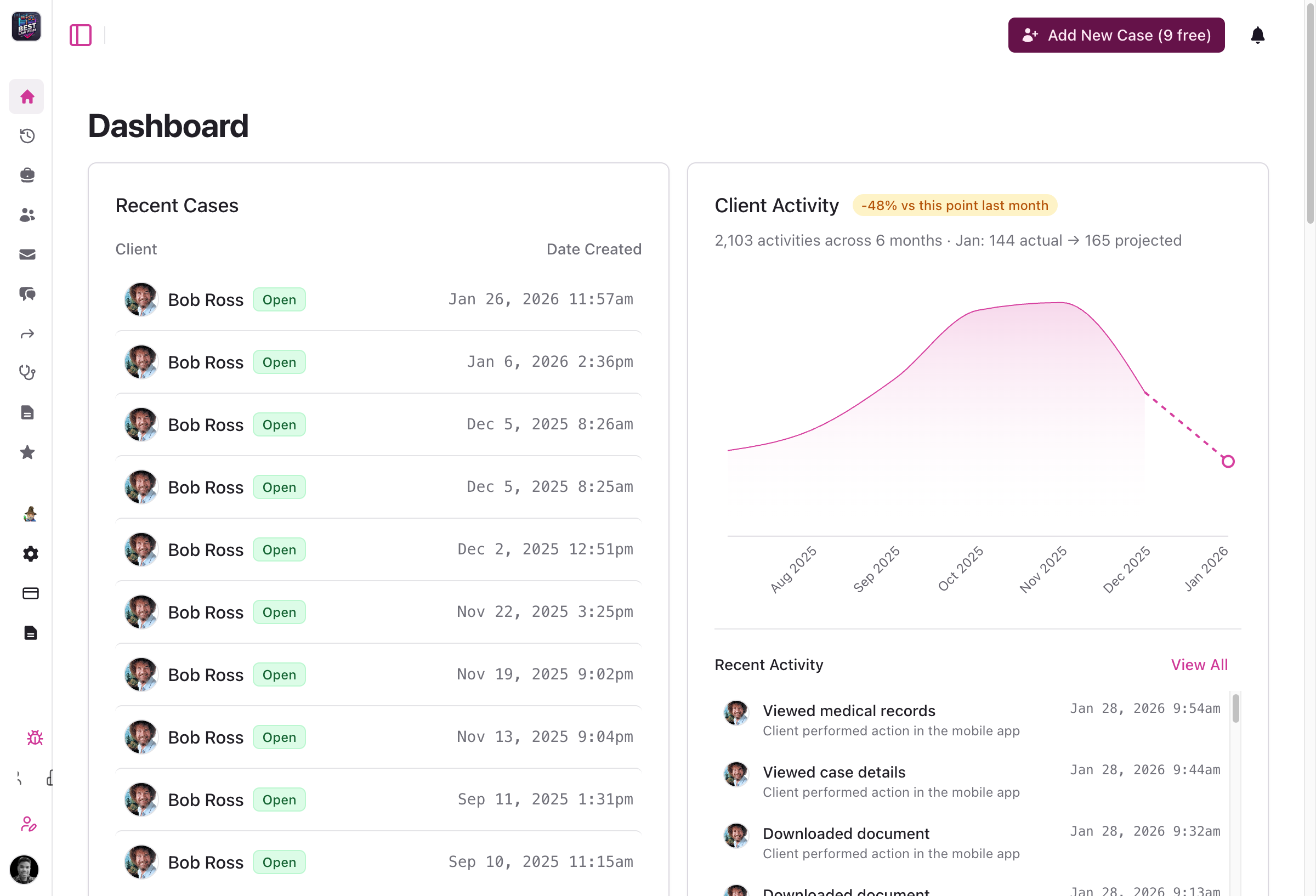
Dashboard with client activity chart and case status badges - Status badges: Visual case status indicators throughout the client interface for quick case state identification
- Activity charts: New client activity charts on the dashboard showing engagement patterns and projections
- Engagement analytics: Detailed analytics on client detail pages with activity metrics
- Better organization: Client activity data moved to dedicated analytics engagement page for clearer insights
Internal Notes System
Keep your team aligned with a new internal notes system for case pages.
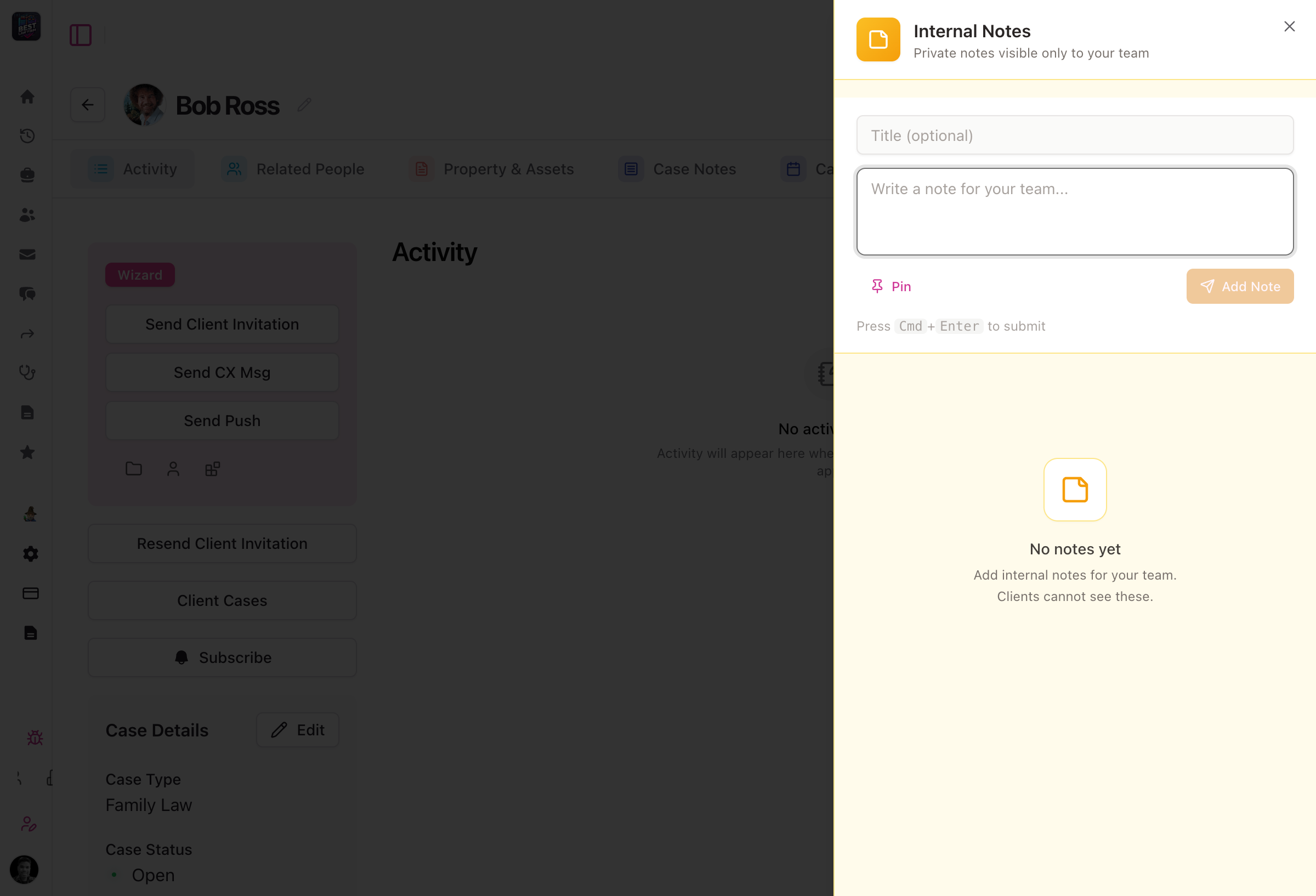
Internal notes dialog on case pages - Firm-only notes: Add internal notes that are only visible to your firm's staff
- Pinned notes: Pin important notes for quick access and visibility across your team
- Threaded replies: Reply to existing notes to keep conversations organized
- Always accessible: Internal notes appear on all case detail pages via a parallel route
Messages Interface Redesign
A cleaner, more powerful messaging experience with card-based layouts and expanded details.
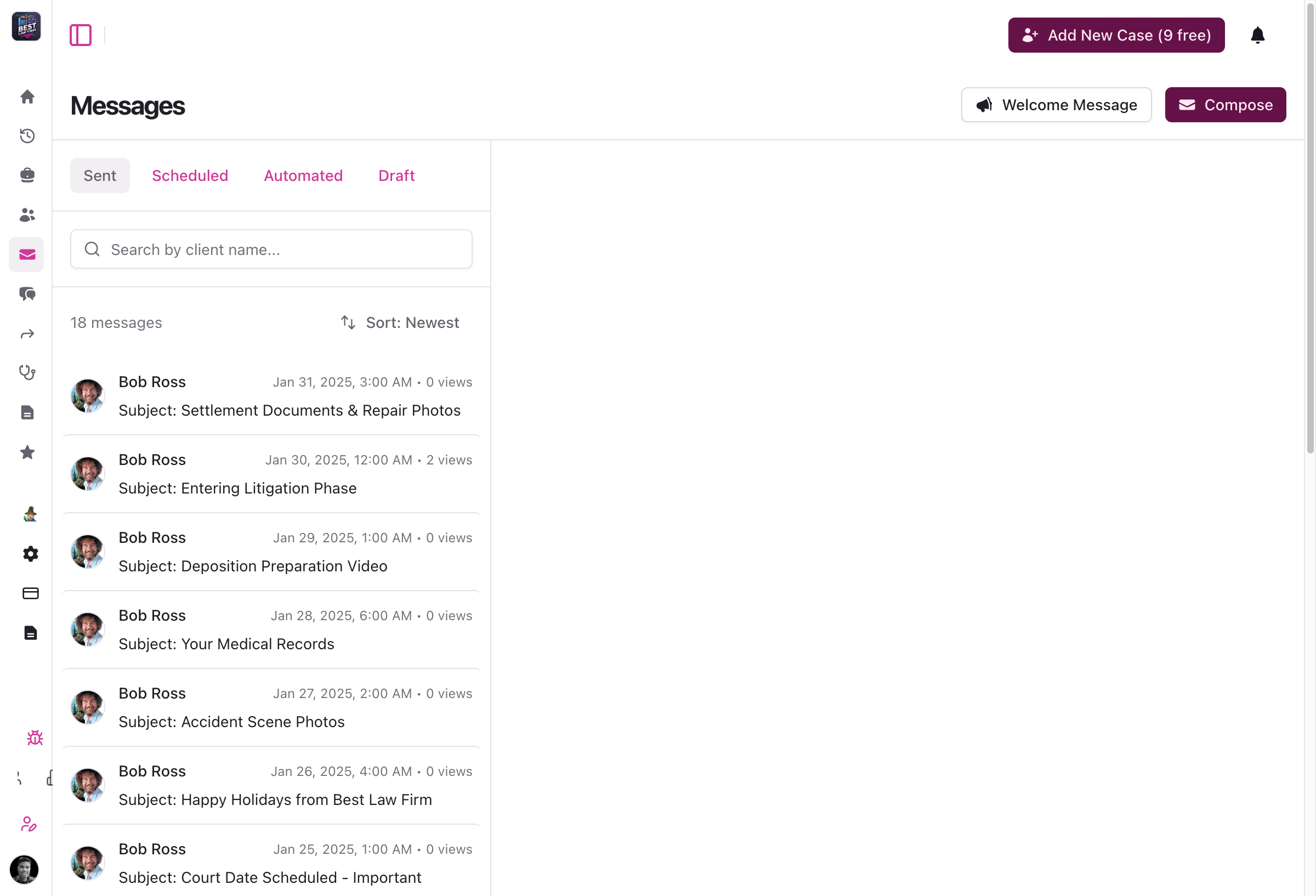
Redesigned messages list view - Card layout: Messages displayed in a clean card-based design for better readability
- Improved search: Enhanced search functionality for faster message discovery
- Sender distinction: Clear differentiation between message sender and creator
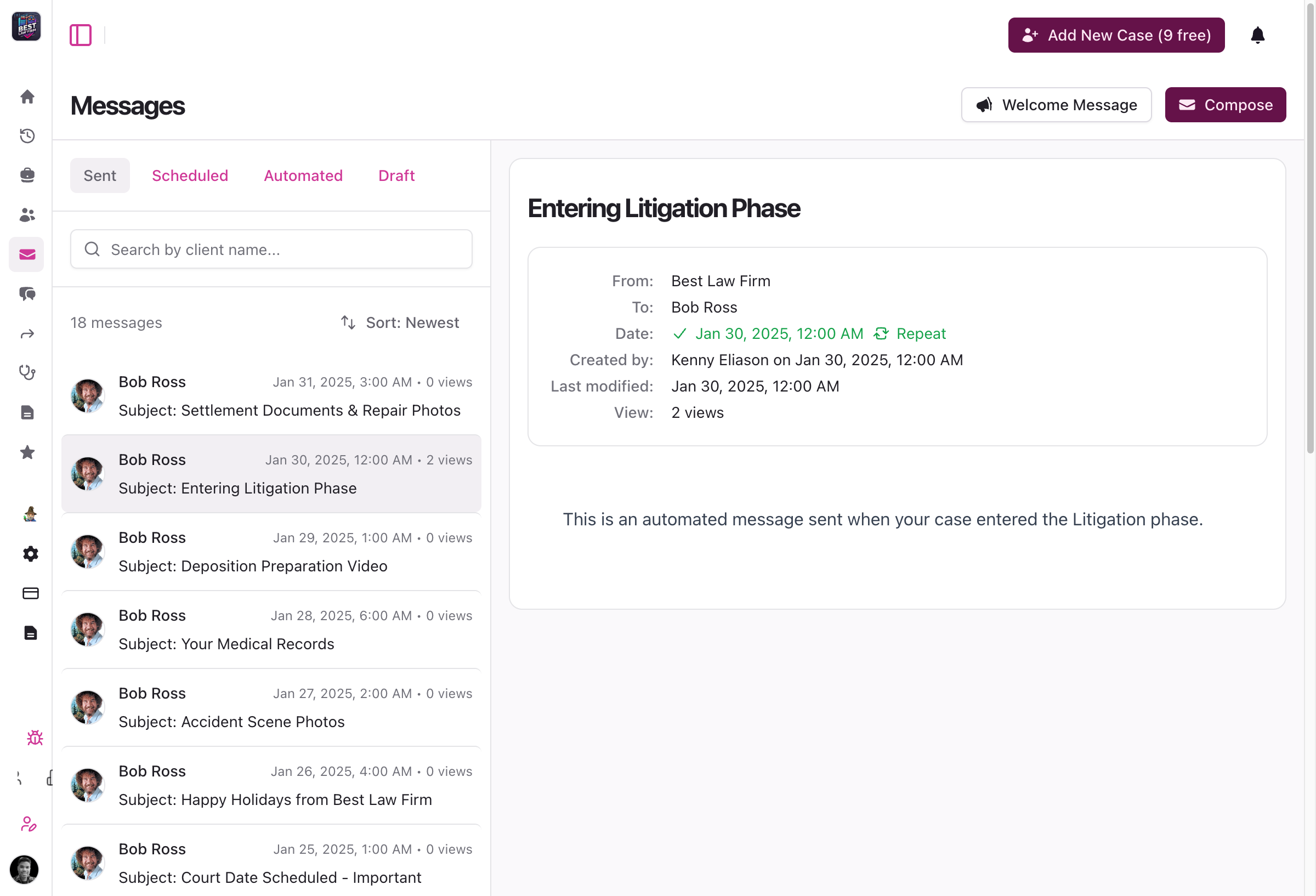
Messages detail view with lightbox - Expanded details: Sheet-based viewer for full message details
- Image lightbox: Click to expand images in messages with a full-screen lightbox
- Better organization: Fixed Activity tab ordering and improved overall navigation
Organization Settings Consolidation
Streamlined organization management with consolidated settings and virtual location support.
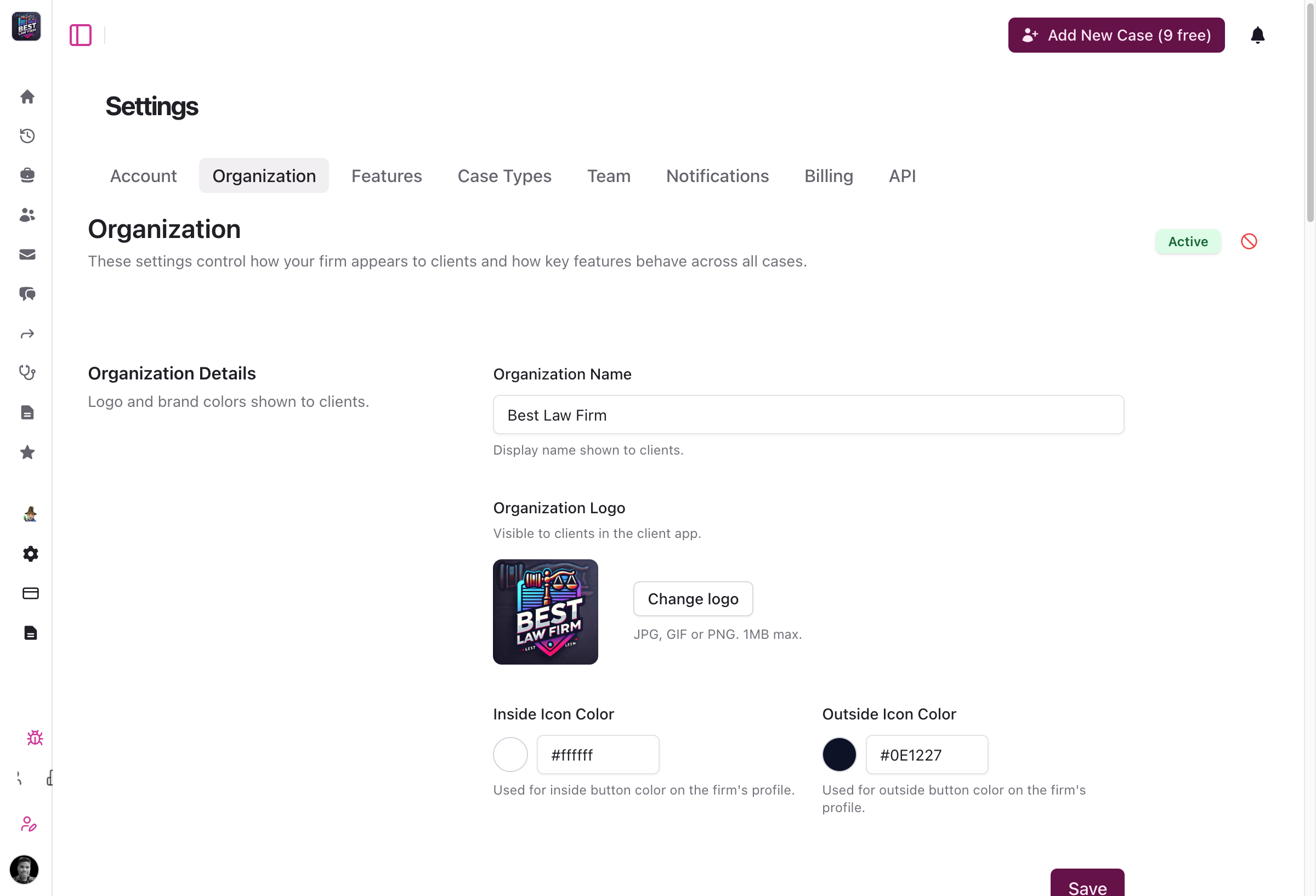
Consolidated organization settings form - Unified settings: Appearance and general settings consolidated into a single form
- Cleaner interface: Simplified navigation for organization configuration
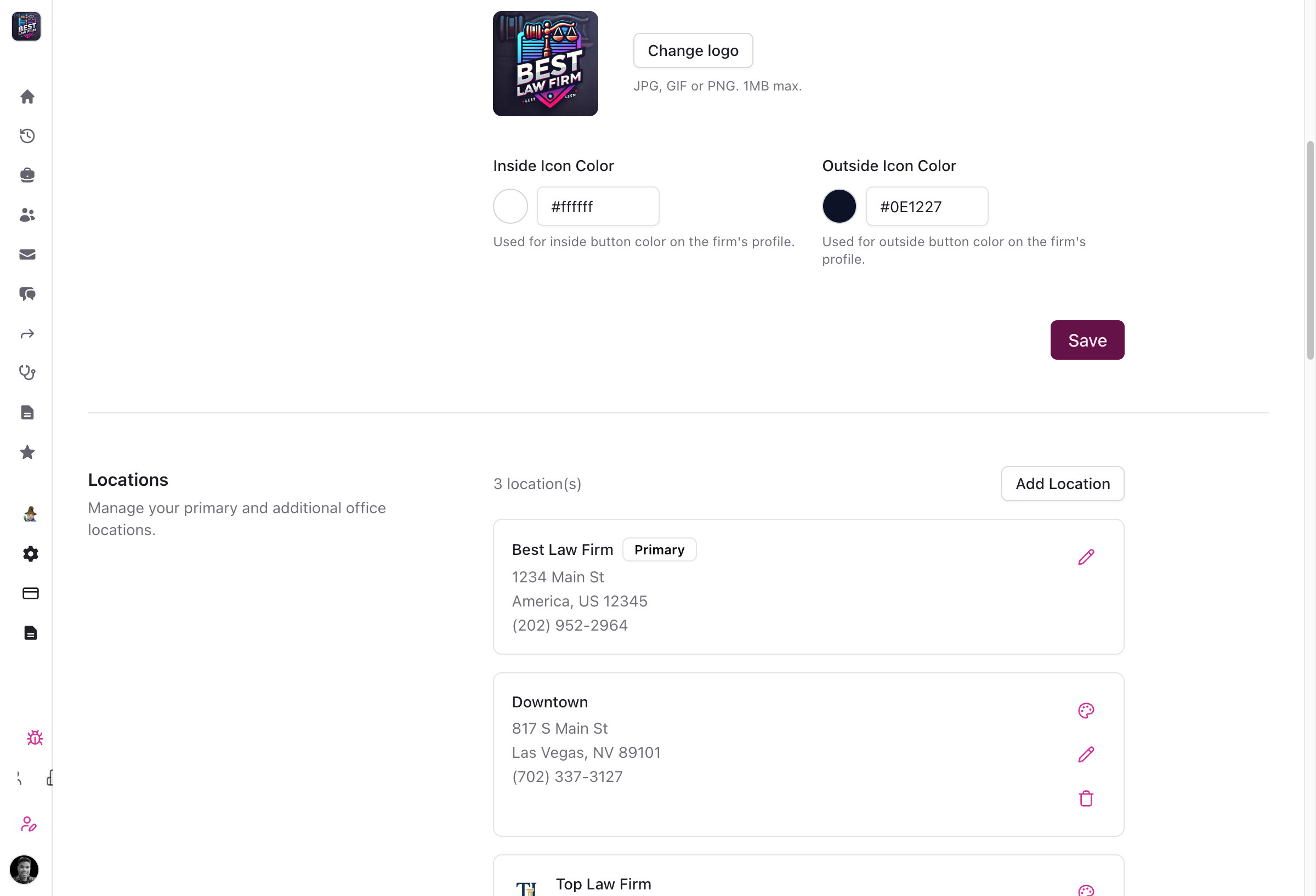
Organization locations management - Virtual locations: Designate locations as virtual/remote without requiring a physical address
- Clear labeling: Virtual locations display a "Virtual" badge throughout the portal
- Better dropdowns: Location selection dropdowns show organization branding names
Provider Management Enhancements
Better organize and track medical providers across your cases.
- Specialty tracking: Add and track medical specialties for each treatment provider (e.g., orthopedic surgeon, physical therapist)
- Treatment types: Record the type of treatment provided at each appointment for better medical record organization
MyCase Integration Improvements
More control over how your cases sync with MyCase.
- Explicit case mapping: Case type suggestions now require your explicit approval instead of automatic application
- Clear unmapping: New "Clear selection" option to easily unmap previously mapped case types
- Compact UI: Case type suggestions appear as compact inline pills for less visual clutter
- Better pagination: Improved data loading with support for up to 1000 items per page
Bug Fixes and Stability
- Activity feed images: Fixed broken image URLs in activity feed caused by incorrect file path handling
- Activity log formatting: Pain score entries now show "Pain Score Added" as the title with body parts in the description
- Client page display: Fixed page title rendering and case status badge display issues
- Neos integration: Case numbers now display correctly instead of showing internal UUID values
- SmartAdvocate integration: Improved reliability of case member creation with better error handling
- Custom case types: V2 API now properly accepts custom CMS case types from integrations like Ethos
Attorney Portal v2026.1.6By Andre Hammons
Family Law Support and Enhanced Multi-Location Management
Version 2026.1.5 adds dedicated family law case support, streamlined multi-location management, and improved message scheduling to the Quilia attorney portal.
👨👩👧 Family Law Case Support
- New case type: Dedicated family law case type with specialized workflows and forms
- Related People tab: Track family relationships and connections between parties involved in family law cases
- Specialized tracking: Purpose-built features for managing the unique requirements of family law practices
🏢 Enhanced Multi-Location Management
- Redesigned onboarding: New CMS connection step features a compact 3-column grid with direct connect buttons for OAuth integrations (Clio, Smokeball, MyCase, CasePeer)
- Location-specific details: Added payments URL and referrals email fields to each location for better organization
- Streamlined workflow: Direct connect buttons replace the previous dropdown-based flow for faster integration setup
💬 Message Scheduling Improvements
- Better readability: Scheduled messages now display in familiar 12-hour format with AM/PM (e.g., "8:45 AM" instead of "08:45")
- Natural language: Automation descriptions use human-readable text like "case opened" instead of technical keys
- Simplified input: Frequency field now uses a clean text input for easier value entry
- Clearer timestamps: Scheduled messages show "scheduled for" with full date and time in your local timezone
✏️ Quick Client Access
- Faster editing: New edit icon next to client names provides one-click access to client information
- Streamlined workflow: Quickly update client details without navigating through multiple pages
📱 Activity Feed Redesign
- Modern design: Refreshed activity feed with brand colors and improved visual hierarchy
- Better formatting: Enhanced timestamp formatting and billing warning displays
- Improved UX: Better spacing, hover states, and interaction patterns
Redesigned Activity Feed 🔄 Improved Case Synchronization
- Immediate feedback: Case sync operations now provide instant visual feedback using real-time status updates
- Fresh data guarantee: Pages automatically reload after sync to ensure you're viewing the latest CMS information
- Better reliability: Enhanced sync process prevents stale data and provides clear error messages
🔧 Bug Fixes & Stability
- MyCase auto-close: Cases now automatically update to 'closed' status when closed in MyCase
- NEOS phase sync: Resolved task errors during case phase synchronization with improved UI responsiveness
- Integration error handling: Import tasks now properly display error messages for unsupported case types
- Provider URLs: Fixed issue where provider website URLs weren't being saved correctly
- Team page stability: Fixed crash that could occur when viewing the team page
- Reputation management: Improved access permissions for legal staff and fixed UI layout issues
Attorney Portal v2026.1.5By Andre Hammons
Enhanced Case Management, Profile Features, and Deep Linking
Version 2026.1.1 adds family law case support, in-app PDF viewing, profile photo uploads, and deep linking from SMS to the Quilia mobile app.
🚀 New Features & Improvements
⚖️ Expanded Case Type Support
- Family Law Cases: Full support for family law matters with property tracking, family-specific contact types (family, attorney, mediator, guardian ad litem), ex-spouse relationships, and payment features
- Case-Specific Features: Each case type now has tailored features and workflows specific to that practice area
📄 Document & Asset Management
- In-App PDF Viewer: View PDF documents directly in the app for message attachments, asset lists, and asset details with native rendering, page navigation, and pinch-to-zoom support
- Multi-Select Bulk Deletion: Delete multiple documents at once for faster case file management
- Property Document Uploads: Improved upload interface with ImageUploadPreview component and automatic asset management integration
- AI-Powered Analysis: Property uploads automatically trigger AI analysis for better organization and insights
👤 Profile Management
- Contact Photo Uploads: Add profile images for contacts, witnesses, other drivers, and emergency contacts directly within the app
- Create and Edit Support: Upload photos when creating new contacts or editing existing ones for better visual identification
🔗 Deep Linking
- Direct App Access: Open the Quilia app directly from SMS and web links (quilia.com/app URLs)
- Universal Links (iOS): Seamless integration with iOS for automatic app opening
- App Links (Android): Native Android deep linking support for faster navigation
📱 Social Media & Organization Features
- Social Media Links: View organization and location social media profiles (Facebook, Instagram, X/Twitter, LinkedIn, TikTok)
- Location Website Override: Locations can have their own website URLs separate from the main organization
💬 User Feedback & Help
- Enhanced NPS Feedback: Optional comment box for users who give low scores (0-6) to better understand concerns
- 7-Day Cooldown: Prevents duplicate NPS prompts for better user experience
- Damages Screen Help: New help modal explains how to document property damage effectively
⚡ Performance & Developer Experience
- Faster App Loading: Optimized initialization with lazy-loaded translation modules for quicker startup
- Local Development Mode: New dev:local script for developers working with local Supabase instances
- Better Error Handling: Graceful handling of missing services and cleaner error messages in development
🔧 Bug Fixes & Stability
Navigation & User Experience
- Improved Error Pages: Better handling of invalid routes with auth-aware navigation that directs users appropriately based on login status
- Settings Accessibility: Access settings and referral forms without requiring an active case context
- Request Form Loading: Fixed issue where draft forms loaded regardless of request status
Platform-Specific Fixes
- Android Photo Uploads: Resolved profile photo upload issues on Android devices using TUS resumable upload protocol
- Web Platform Translations: Fixed translation loading on web to ensure all content displays in the correct language
- Video Embeds: Fixed YouTube video sizing to use proper 16:9 aspect ratio
User Engagement & Analytics
- NPS Feedback: Modal now closes properly after submitting feedback comments and shows comment box regardless of response state
- Analytics Tracking: Improved PostHog identification for returning users with enriched feature analytics
UI Components
- BackButton Icons: Fixed chevron icon to use dark color on light backgrounds
- Cancel Button Style: Alert dialog Cancel buttons now use proper 'cancel' style for web compatibility
🔐 Account Management
- Enhanced Security: Account closure now uses secure authenticated API endpoint instead of third-party webhooks
- Inclusive Terminology: Updated language to use "legal team" instead of "attorney" for broader applicability
iOS v2026.1.1Android v2026.1.1By Andre Hammons
AI-Powered Case Type Auto-Mapping Now Available
This release adds AI-powered case type auto-mapping to Quilia. The system uses heuristic matching to categorize cases automatically, with high-confidence results applied instantly and lower-confidence suggestions sent for manual review.
Case Type Management
-
AI-powered case type auto-mapping uses heuristic matching to categorize incoming cases
-
High-confidence mappings (70%+) apply automatically without manual input
-
Lower-confidence suggestions display in a review interface for staff to confirm or correct
Activity Logs
-
Export activity logs in CSV and PDF formats with chronological ordering
-
Access signed attachment URLs with 24-hour expiration for secure sharing
-
Timeline-style PDF layout includes embedded images for clearer presentation
Incident Forms
-
Vehicle form now shows conditional fields based on vehicle type (motor vehicle, motorcycle, bicycle, pedestrian)
-
Context-aware placeholders and native select dropdowns for faster data entry
Additional Improvements and Bug Fixes
-
Fixed case_phases unique constraint to allow the same import_id across different CMS integrations
-
Added async mode to Zapier integration to prevent timeout issues
-
Resolved infinite spinner on vehicle form save button by preprocessing empty strings to null
-
Fixed XSS vulnerabilities and improved HTML sanitization
-
Improved pagination and assignment controls in reputation management
Attorney PortaliOSAndroidWeb App-
Case Expansion, Visibility Improvements, and Reliability Upgrades
This release focuses on expanding supported case types, improving visibility into records and payments, and continuing to strengthen overall platform reliability. Much of this work improves clarity and consistency across the system while reducing edge cases for firms as they scale.
Case and Records Enhancements
Expanded support for additional case types and clearer record tracking.
-
Added full support for bankruptcy cases, including Assets & Debts, Creditors, and Plan Payments sections. See also our Family Law case type added later in January
-
Added medical records status indicators for providers to track whether records have been requested or received
-
Added payment activity logging with amount, date, and status visibility
Settings and Admin Experience Improvements
Clearer configuration and more predictable admin behavior.
-
Added improved helper text across settings pages to clarify client-facing visibility
-
Added social media fields to organization locations
-
Reorganized profile settings into independent sections with individual save actions
Integrations and Data Enhancements
Improved reliability and completeness when syncing data.
-
Improved Filevine staff imports with better handling of nullable fields and error cases
-
Removed client search limits in reputation features to include all clients
-
Improved activity logging support for payments across integrations
Platform Stability and Bug Fixes
Ongoing reliability and quality improvements across the platform.
-
Fixed permission issues preventing new organizations from creating cases
-
Improved handling of null and undefined profile image and address fields
-
Fixed validation issues in profile and authentication forms
-
Improved backend cleanup and resource management to reduce orphaned data
Attorney Portal v2026.1.1By Kenny Eliason
-
Personal Injury Case Type, AI Document Analysis & Welcome Messages
We shipped a solid update focused on making Quilia easier to run, easier to trust, and easier for clients to stay involved. This release adds a ready-to-use personal injury case type, improves how documents are handled with AI, introduces smarter inactivity monitoring, and makes it easier to welcome new clients inside the app.
Personal Injury Case Type
We added a built-in personal injury case type for firms that don’t categorize cases in their case management system.
What it does
-
Provides a clean default for personal injury cases
-
Requires no additional setup
-
Works automatically across layouts, integrations, and the API
Why it matters Not every firm wants to manage a complex case-type structure. This gives firms a simple option that just works out of the box, while still supporting more detailed setups for teams that need them.
If your system already categorizes cases, nothing changes. If it doesn’t, you’re covered.
Smarter Asset Analysis
Quilia’s document intelligence just got a lot sharper.
When clients upload documents, Quilia automatically analyzes each file and helps organize it correctly, while still respecting human decisions when they matter.
What’s new
-
AI-assisted asset classification that feels predictable and reliable
-
Human-labeled documents are preserved
-
Consistent behavior across all uploads
Why it matters Your team gets the speed of AI without losing control. Documents land where they belong, classifications stay accurate, and everything feels less like a black box and more like a tool you can trust.
Inactivity Monitoring
We added a built-in way to bring clients back into the app when things go quiet.
What it does
-
Automatically detects inactive clients
-
Sends smart, timezone-aware nudges when attention is needed
-
Requires no manual follow-up
Why it matters Clients stay engaged without your team chasing them down. When there’s something to review or action to take, Quilia helps pull them back in at the right moment.
Less babysitting. Better engagement.
Automated Welcome Messages
Quilia now makes it easy to welcome new clients the moment they join.
Firms can automatically send a welcome message directly inside the app, giving clients clear next steps and setting expectations from day one.
What it does
-
Sends a welcome message automatically when a client joins
-
Delivered right inside the Quilia app
-
Fully customizable to match your firm’s voice
Why it matters Clients know what’s happening, what to expect next, and how to use the app without needing a separate email or manual follow-up. It’s a better first impression and one less thing for your team to remember.
Bug Fixes and Improvements
Alongside these updates, we shipped a batch of refinements to keep everything running smoothly.
-
Improved asset processing reliability
-
Stronger error handling for Neos case imports
-
Clearer logging and validation for Clio webhooks
-
More accurate reputation and ratings displays
-
Simplified sidebar navigation
-
General performance and stability improvements across the platform
Quiet upgrades, but they add up.
Attorney Portal v2025.12.5By Kenny Eliason
-
Platform Stability, Automation, and Admin Controls
This release focuses on making Quilia more reliable, more predictable, and easier to manage as teams scale. A lot of this work lives under the hood, but the impact shows up everywhere: smoother workflows, clearer controls, and fewer edge cases.
If things feel quieter lately, that’s the point.
Automation and Workflow Improvements
More automation with better guardrails so the system helps without getting in the way.
-
Weekly release digest automation with AI-generated summaries and Slack notifications
-
Sync Active Cases button now includes auto-sync interval protection and a confirmation dialog
-
Consolidated batch sync functionality across all CMS integrations
-
Automated messaging support for pending cases
-
Phase message workflow support with Novu automation and message operation webhooks
-
Configuration badges in message previews showing enabled features like FAQs, NPS surveys, and review prompts
Admin and Permissions Updates
Cleaner controls so the right people have access to the right tools.
-
Configuration management now available to both admins and wizards
-
“Send as firm” restricted to attorneys, admins, and wizards
-
Subscriptions now support soft-disable instead of permanent deletion for safer recovery
-
Team member filters now track selection by user ID to prevent duplicate-name conflicts
-
Select all and deselect all controls added to team member filters
Integrations and Data Sync Enhancements
More resilient integrations with less manual cleanup.
-
Clio integration now imports related contacts from matters, automatically creating client records for contacts with valid phone numbers
-
Integrations now auto-initialize imports and subscriptions when first connected
UI and Case Experience Improvements
Small improvements that add up to a smoother day-to-day experience.
-
Case status info modal with icon-based explanations for each status
-
Location fields added for legal appointments
-
CaseChat date separator formatting fixed for clearer timelines
-
Max-width constraint added to the chat window for improved readability
General Improvements and Bug Fixes
A solid round of stability and polish across the platform.
-
PDF generation crash in verification letters resolved
-
Email subject alignment in message previews corrected
-
Placeholder text added to translations for better localization consistency
-
React key warnings in the dashboard activity chart and avatar component resolved
-
Module resolution issues with MCP server packages fixed
-
Build stability improved by moving esbuild to production dependencies
-
False 500 errors in Novu subscriptions resolved
-
Fuzzy matching added for client validation to prevent false negatives
-
Rate limit middleware now gracefully handles optional API keys for public routes
Attorney PortalIntegrationsBackendBy Kenny Eliason
-
New: Reputation Management
Quilia now includes a full reputation management system integrated with Google Business Profile. This builds on the NPS and review collection features we introduced earlier in December.
Learn more about what this means and how it works: 👉 quilia.com/how-it-works/reputation-management/
Firms can now manage reviews from one place, trigger review requests at the right moments, and make it easy for clients to leave feedback without friction.
What’s new
-
A centralized reputation management dashboard powered by Google Business Profile
-
Location-based Google review links with smart organization fallback
-
Short, shareable review links for texts, emails, and follow-ups
-
Staff-level filtering and Google review assignments
-
Automated NPS and Google review flows built directly into the mobile app
This gives firms a repeatable way to turn real client experiences into real reviews, without chasing links or juggling tools.
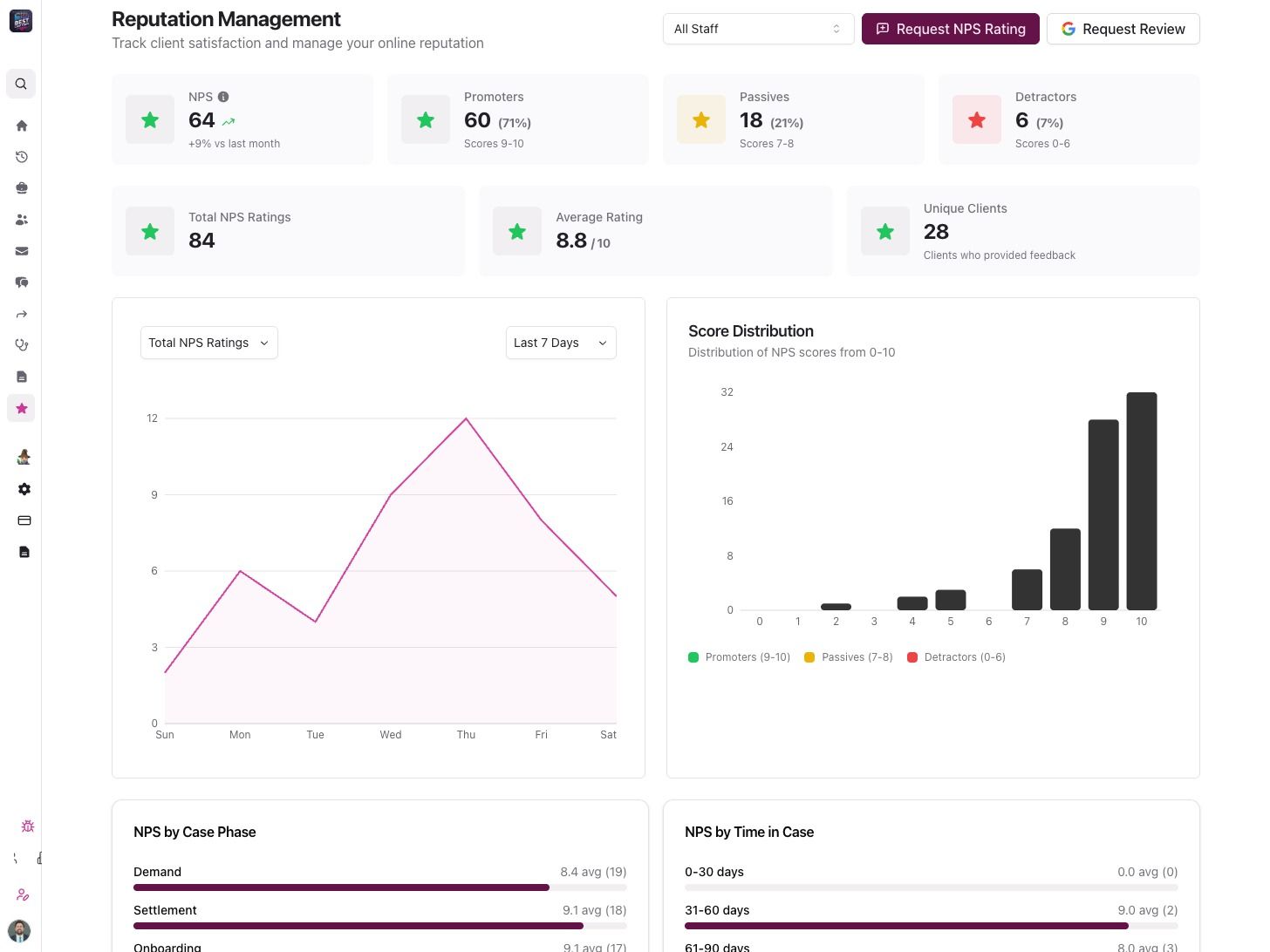
New Reputation Dashboard for Managing Client Feedback Platform Improvements
Alongside reputation management, we shipped a solid batch of platform upgrades.
-
New API endpoints to retrieve request responses
-
Improved message grouping and view count tracking
-
Optimized phase message editor and translation experience
-
Standardized date and time handling across the portal
Fixes and Refinements
-
Resolved date and time display inconsistencies
-
Improved handling of optional integrations during case creation
-
Fixed edge cases in reputation workflows and OAuth handling
-
Cleaned up UI and data consistency issues across Portal and Mobile
Attorney PortaliOSAndroidWeb AppBy Kenny Eliason
-
Faster Client Responses and Better Reviews for Attorneys and Law Firms
Client communication just got even easier across Quilia — whether your team is working in the portal, on mobile, or through our browser tools. This update brings new messaging capabilities, automatic follow-ups, better review collection, improved image support, expanded language access, and a smoother experience inside our Chrome and Firefox extensions.
Key Updates in This Version
Collect Feedback and Reviews Effortlessly
Firms can now request client feedback without leaving the conversation. This feature is part of our full Reputation Management system launched later in December.
-
Ask for NPS scores directly inside messaging
-
Prompt satisfied clients to leave a Google review
-
Customize survey timing and flow
Why it matters:
This makes gathering client sentiment and building your online reputation easier and more consistent.
Automatic Follow-Up Messages for Unanswered Chats
Clients sometimes forget to respond — now Quilia reminds them automatically.
-
Sends an SMS nudge when a CaseChat message hasn’t been answered
-
Keeps clients engaged and reduces delays
-
Helps staff spend less time chasing responses
Why it matters:
Important updates get seen, cases move faster, and attorneys get quicker replies.
Expanded Language Support: Hindi
Quilia is now easier to use for Hindi-speaking clients and staff.
-
Full Hindi translation available
-
More inclusive and accessible communication
Why it matters:
Firms can support a wider range of clients with a more comfortable experience.
Better Handling of iPhone Photos
HEIC images (the default on Apple devices) now display consistently everywhere.
-
Automatic conversion for smooth viewing
-
No more unreadable or missing images
-
Clearer documentation for injury photos and uploads
Why it matters:
Your team can rely on consistent, error-free photo uploads from every client.
A Smoother Experience Across Chrome & Firefox
Your browser workflow is now faster, simpler, and more intuitive — whether your team uses Chrome or Firefox. We’ve brought the same communication improvements into the extension so everything feels seamless from portal → mobile → browser.
Faster, Easier Chat Management
-
Quickly search conversations
-
Start new chats more efficiently
-
Navigate messages with less clicking
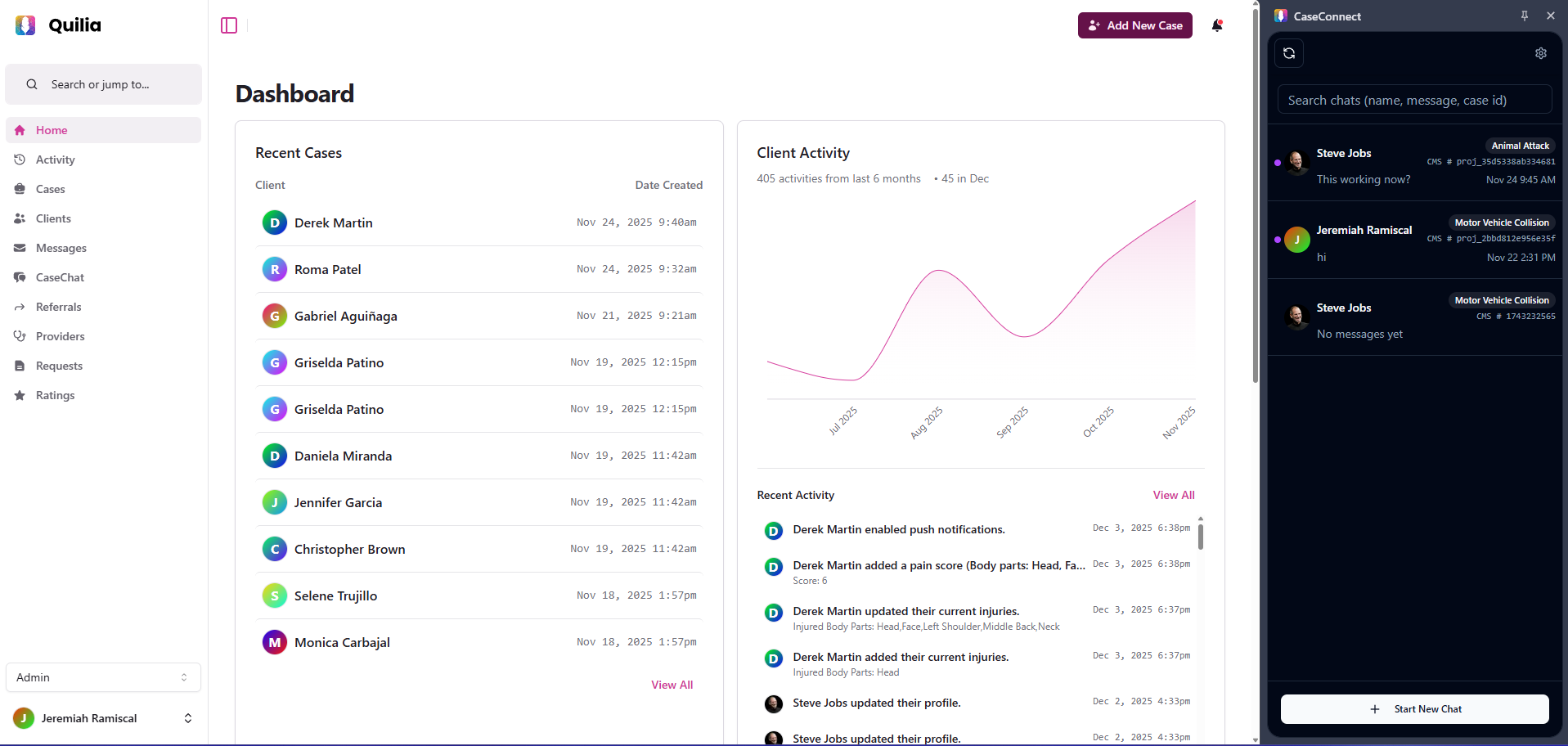
Quilia dashboard with CaseConnect open, showing chat search and new chat options. Why it matters:
Your team can respond faster and stay organized, especially during high-volume workdays.
Improved Image Viewing
-
Images appear inline automatically
-
Click/tap to view fullscreen
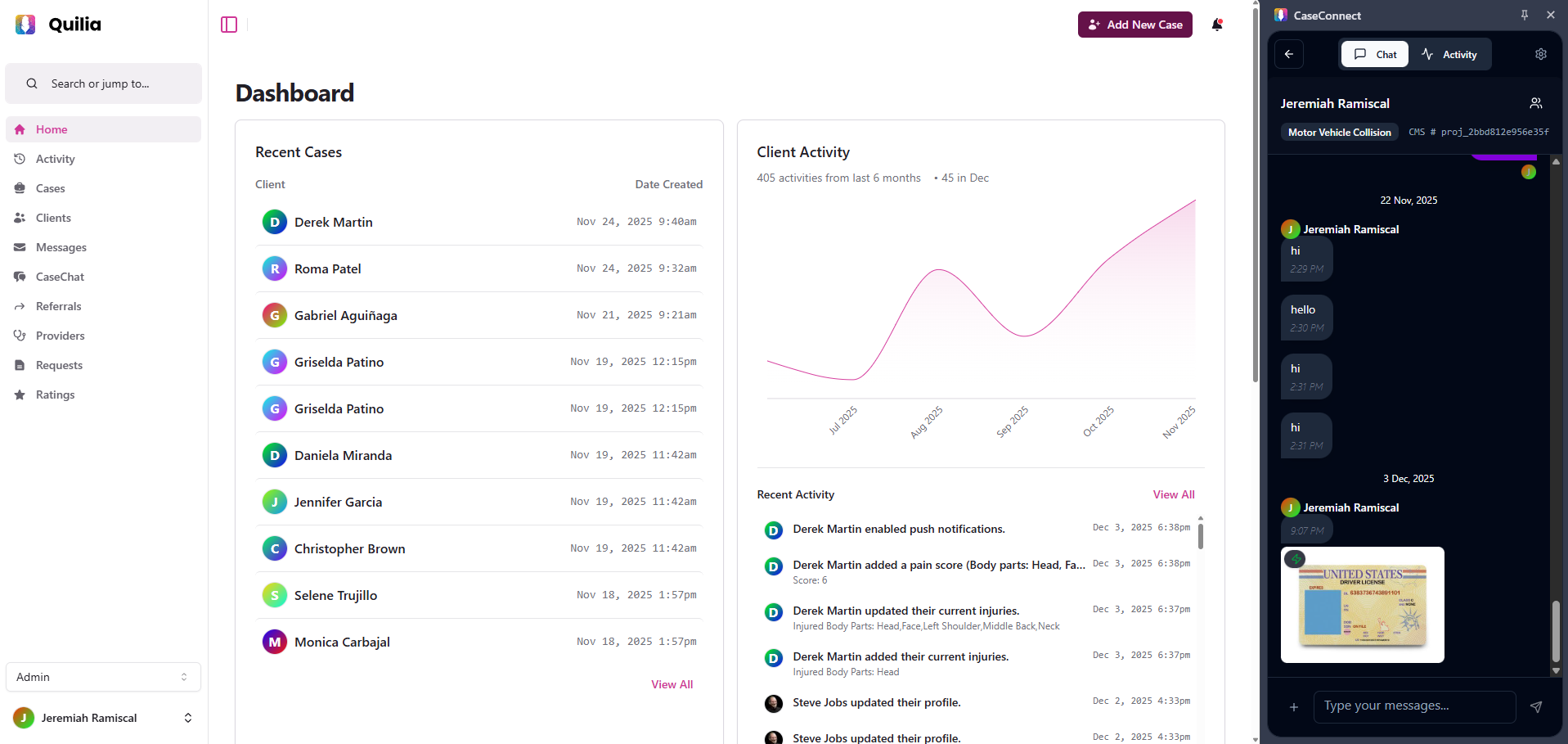
Quilia dashboard with CaseConnect displaying client chat history and shared images. Why it matters:
Reviewing images — injury photos, documents, screenshots — is now much smoother.
Things To Keep In Mind
-
Review and feedback prompts can be tailored to your preferences
-
Automatic follow-ups help clients respond more reliably
-
The Firefox extension is now available
-
Image uploads from all devices now work consistently
What’s Next
We’re developing a feature that can pull key details straight from the documents clients upload. When a client submits something like a medical record, Quilia will recognize important information and help update the case automatically — such as identifying the medical provider, noting documented injuries, or linking related appointments.
This will reduce manual data entry and help ensure cases stay accurate and complete with far less effort from your team.
Chrome ExtAttorney PortaliOSAndroidBy Jeremiah Ramiscal
-
Case Management, Scheduling, and Workflow Enhancements for Law Firms
Managing cases, appointments, and documents inside the Quilia Portal is now faster, clearer, and more organized. This release focuses on upgrades that reduce manual work, improve accuracy, and make it easier for attorneys and staff to keep cases moving.
Key Updates in This Version
CasePeer Integration Enhancements
Importing CasePeer matters into Quilia is now much simpler:
-
Paste a CasePeer case URL into Quilia and we’ll pull the case in automatically
-
The Date of Incident displays before you import, helping confirm you’re selecting the right case
-
Key case info syncs directly into the new Quilia file
Why it matters:
No more searching for case IDs or worrying about pulling in the wrong case. Imports are faster, clearer, and more reliable.
Neos Integration Enhancements
Neos-connected firms now have smoother and more consistent case imports.
What’s improved
-
More reliable case import flow
-
Better syncing of client and case information
-
Standardized experience across all supported case management systems
Why it matters:
Firms using Neos now get the same seamless import and syncing experience enjoyed by other platforms.
Legal Appointments Calendar
A new centralized calendar makes it easier to manage legal appointments without switching tools.
What’s improved
-
View and track appointment statuses in one place
-
Helpful warnings when modifying confirmed appointments
-
Cleaner layout combining start and end times
-
Automatic status updates when changes are made
📌 Appointment UI previews
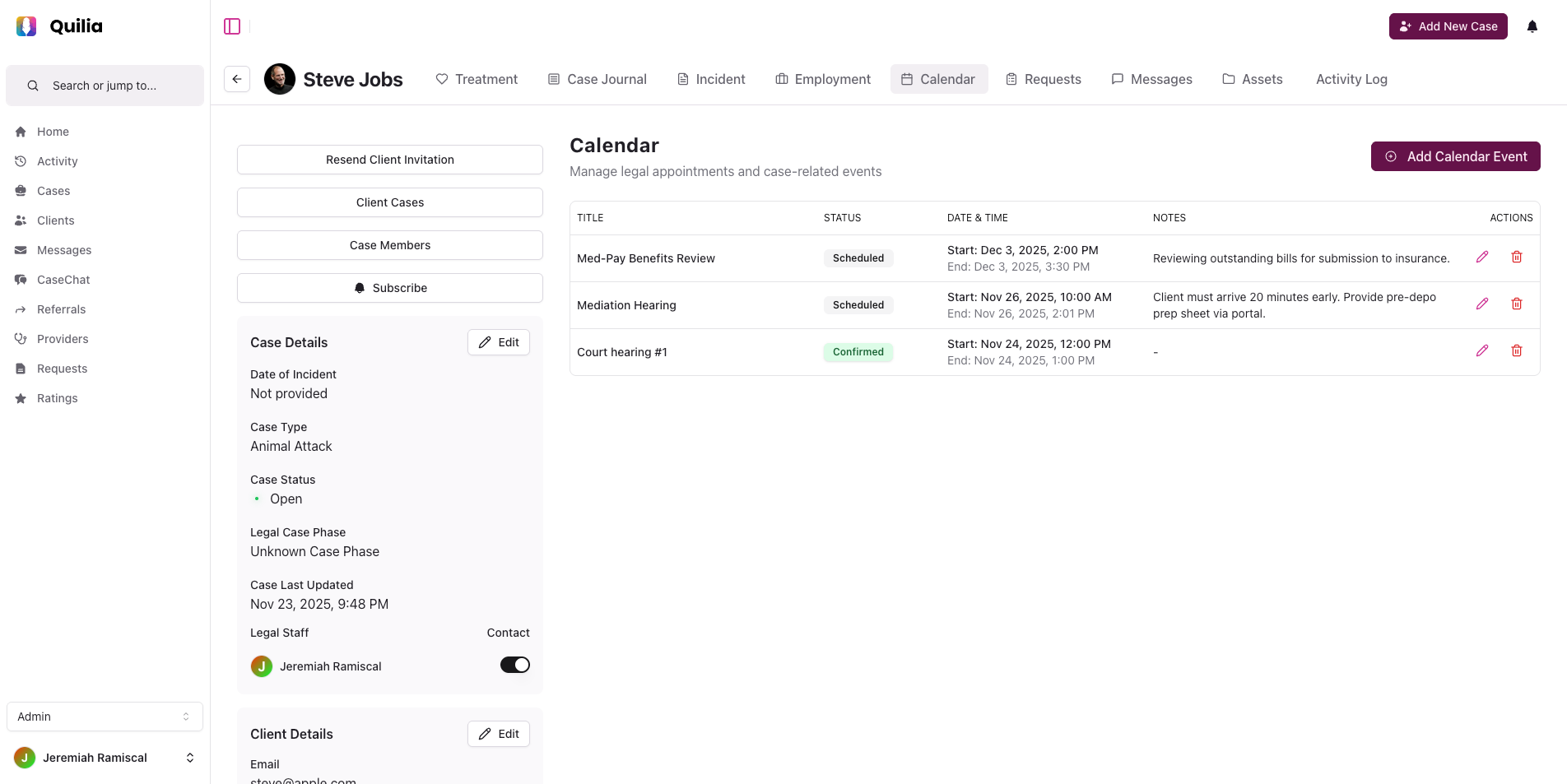
Quilia case calendar with scheduled and confirmed legal appointments for a client case. 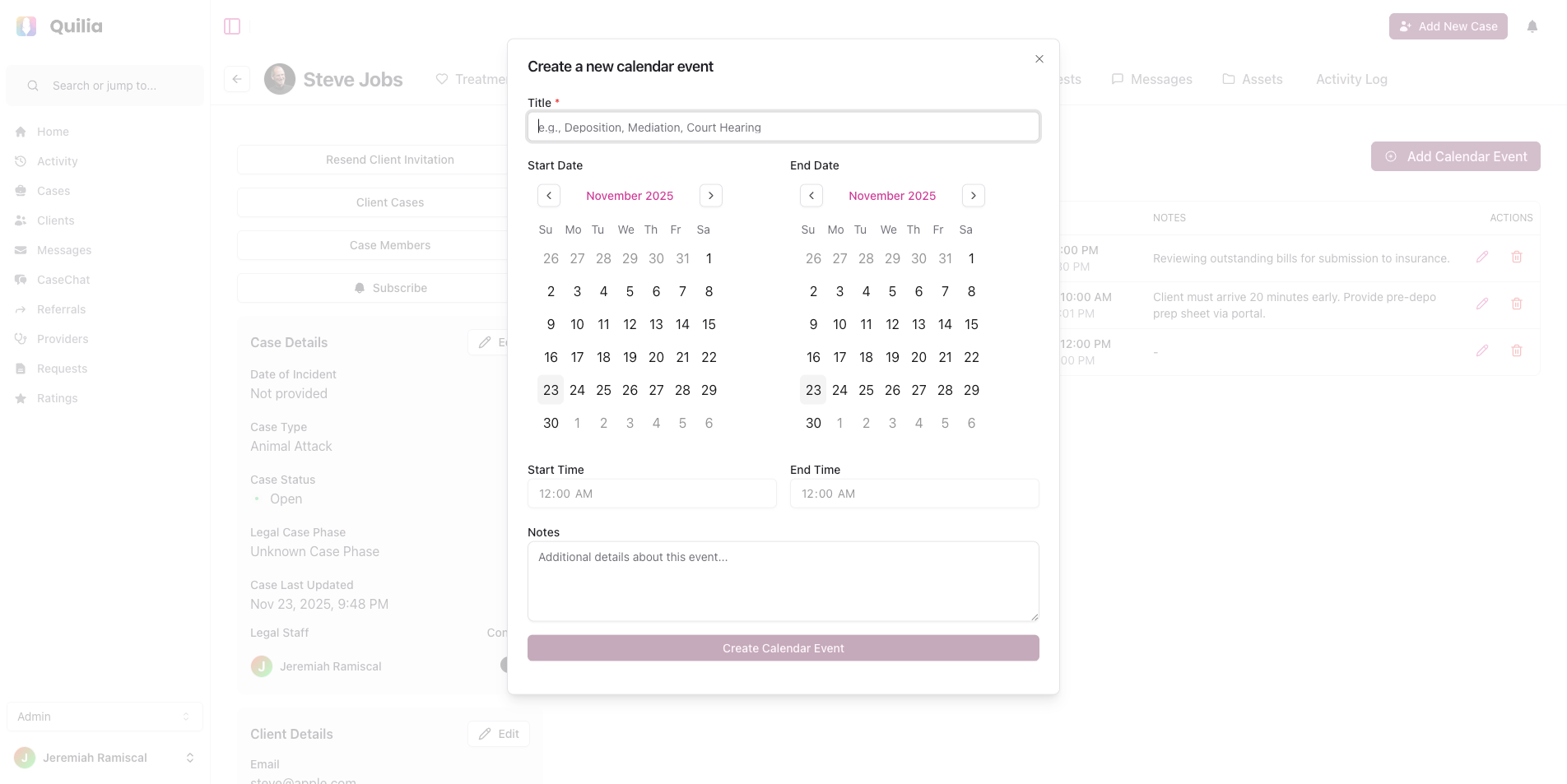
Quilia new calendar event form with date pickers and time fields. Why it matters:
Helps your team stay organized and prevents scheduling mistakes or conflicting updates.
Employment Case: Incident Log Page
Employment firms now have built-in tools for documenting workplace incidents.
What’s improved
-
New incident log page inside employment matters
-
Structured fields for documenting incident details and evidence
Why it matters:
Keeps employment cases organized and ensures important details never get lost in emails or scattered files.
Enhanced Asset Viewing (Unified Lightbox Gallery)
A brand-new gallery lets you view all photos, documents, and videos in one place.
What’s improved
-
One unified gallery for images, videos, and PDFs
-
Quickly move between different types of evidence
-
No external apps needed
📌 Preview of the new gallery
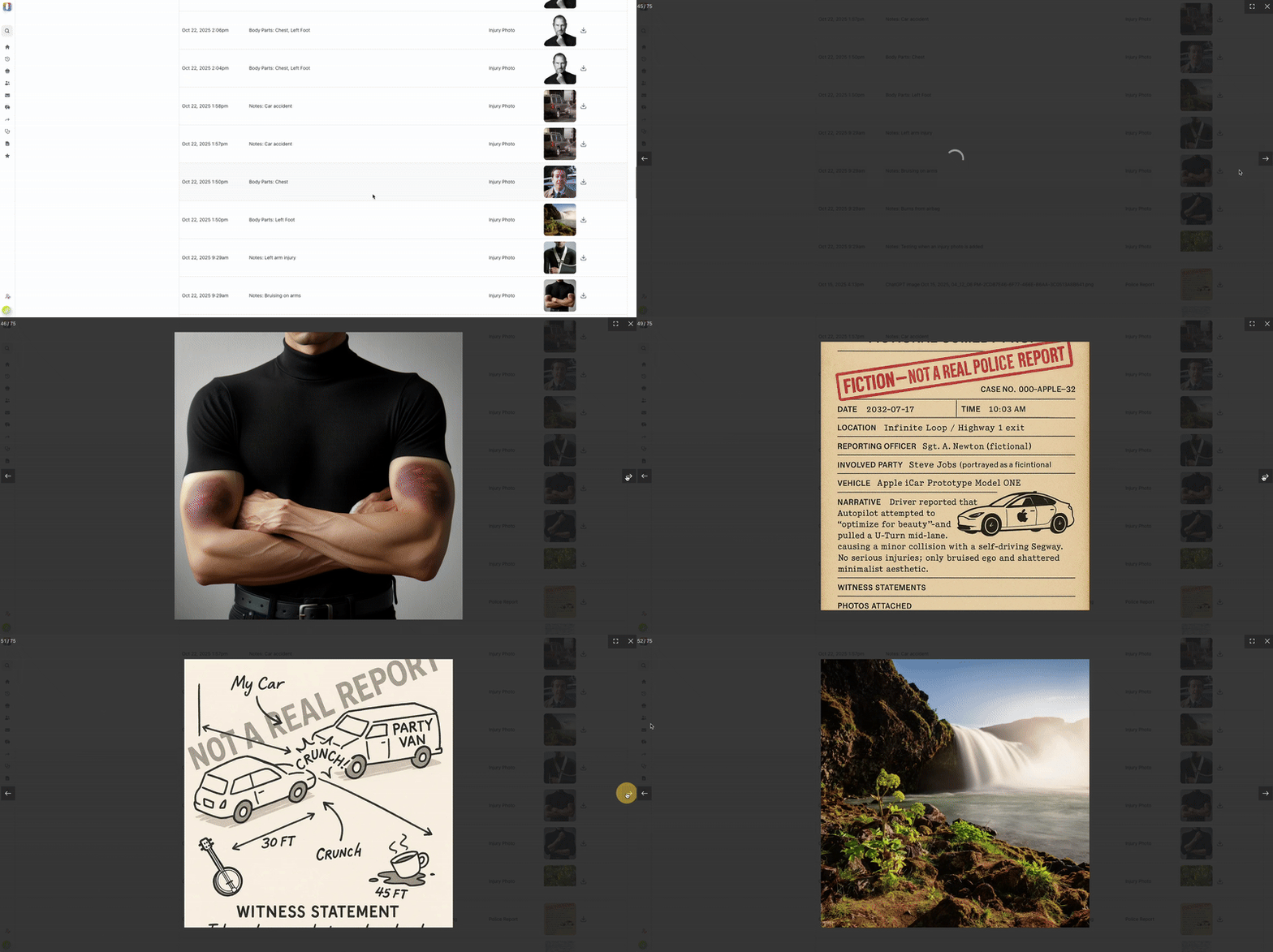
GIF demonstrating Quilia’s gallery-style asset viewer for injury photos and uploads. Why it matters:
Reviewing case evidence is now simpler and much more efficient — ideal for attorneys preparing demand packages or negotiating with adjusters.
Bulk Team Member Import with AI Column Mapping
Adding new team members to Quilia is now effortless — especially for growing firms.
What’s improved
-
Upload a CSV or Excel file and Quilia will recognize the correct fields automatically
-
Supports flexible formats — no strict templates required
-
Detects duplicates and updates existing users
-
Automatically resends invitations when needed
📌 Bulk import preview
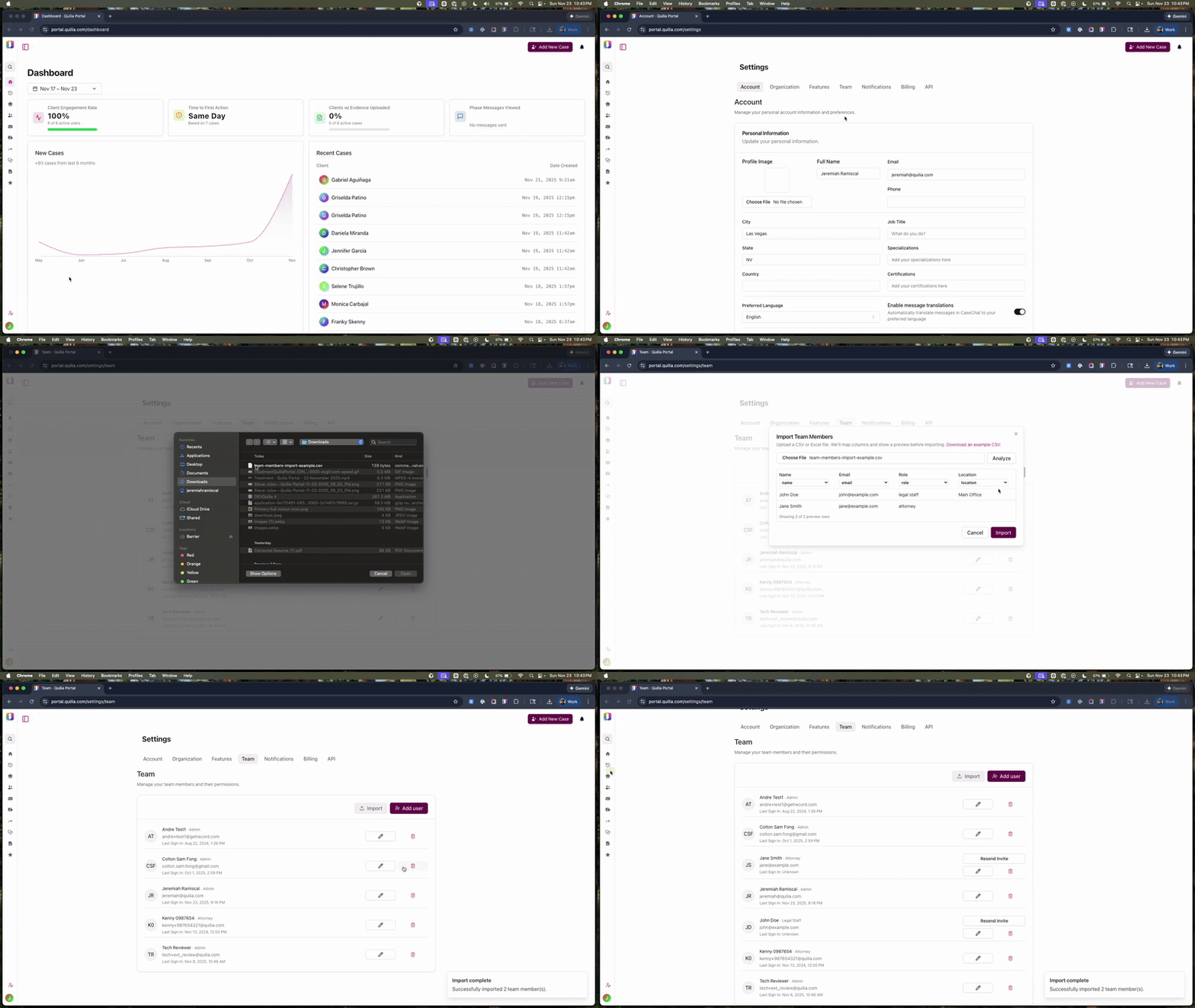
GIF showing the bulk legal staff import process inside the Quilia Portal. Why it matters:
Law firms can onboard staff in minutes instead of entering each person manually. Perfect for expanding firms or those with large support teams.
General Workflow Improvements
We’ve made a series of updates across forms, case activity, and overall portal usability to make day-to-day work smoother for your team.
What’s improved
-
License plate field added to vehicle records for more complete documentation
-
New date/time and location fields for incident reports
-
Built-in lightbox viewer for incident photos and evidence
-
Pain score filter now defaults to “all time”
-
Search bar added to Activity Logs for faster lookups
-
Pagination for long-running or high-volume cases
-
Faster loading across large case histories
-
New forms and galleries now available across all case types
-
Appointment status updates are clearer and easier to follow
-
All imports from connected case management systems use a unified, simplified flow
Why it matters:
These enhancements make it easier to capture complete information, review case details quickly, and keep your entire team aligned with less clicking, less searching, and fewer workflow interruptions.
What's Next in Quilia
We’re developing a feature that can pull key details straight from the documents clients upload. When a client submits something like a medical record, Quilia will recognize important information and help update the case automatically — such as identifying the medical provider, noting documented injuries, or linking related appointments.
This will reduce manual data entry and help ensure cases stay accurate and complete with far less effort from your team.
Attorney PortalIntegrationsBy Jeremiah Ramiscal
-
Custom Requests Are Here — Collect Any Client Info, Instantly
Managing client updates and forms just got easier. This release introduces Custom Requests — a faster, more flexible way to collect information from clients.
Key Updates in This Version
Custom Requests
Create and send digital forms directly from the Quilia Portal — no emails, no PDFs, no paper trails. Whether it’s a TBI update, injury check-in, discovery request, or post-settlement feedback, you can now collect exactly what you need in minutes.
-
Build forms with text boxes, drop-downs, checklists, or uploads
-
Send instantly to clients with push notifications
-
Clients fill out and upload files right from their phone
-
Submissions appear in your Requests tab and sync back to your case management system
Why it matters: Custom Requests give firms total flexibility to gather client information at any point in the case — turning what used to be multiple phone calls or email threads into one quick digital exchange.
View Every Request in One Place
Stay on top of every request, response, and upload from the Requests page. See who it was sent to, when it was completed, and what’s still pending.
📌 Access the full history of client interactions at a glance — keeping every update organized and case-ready.
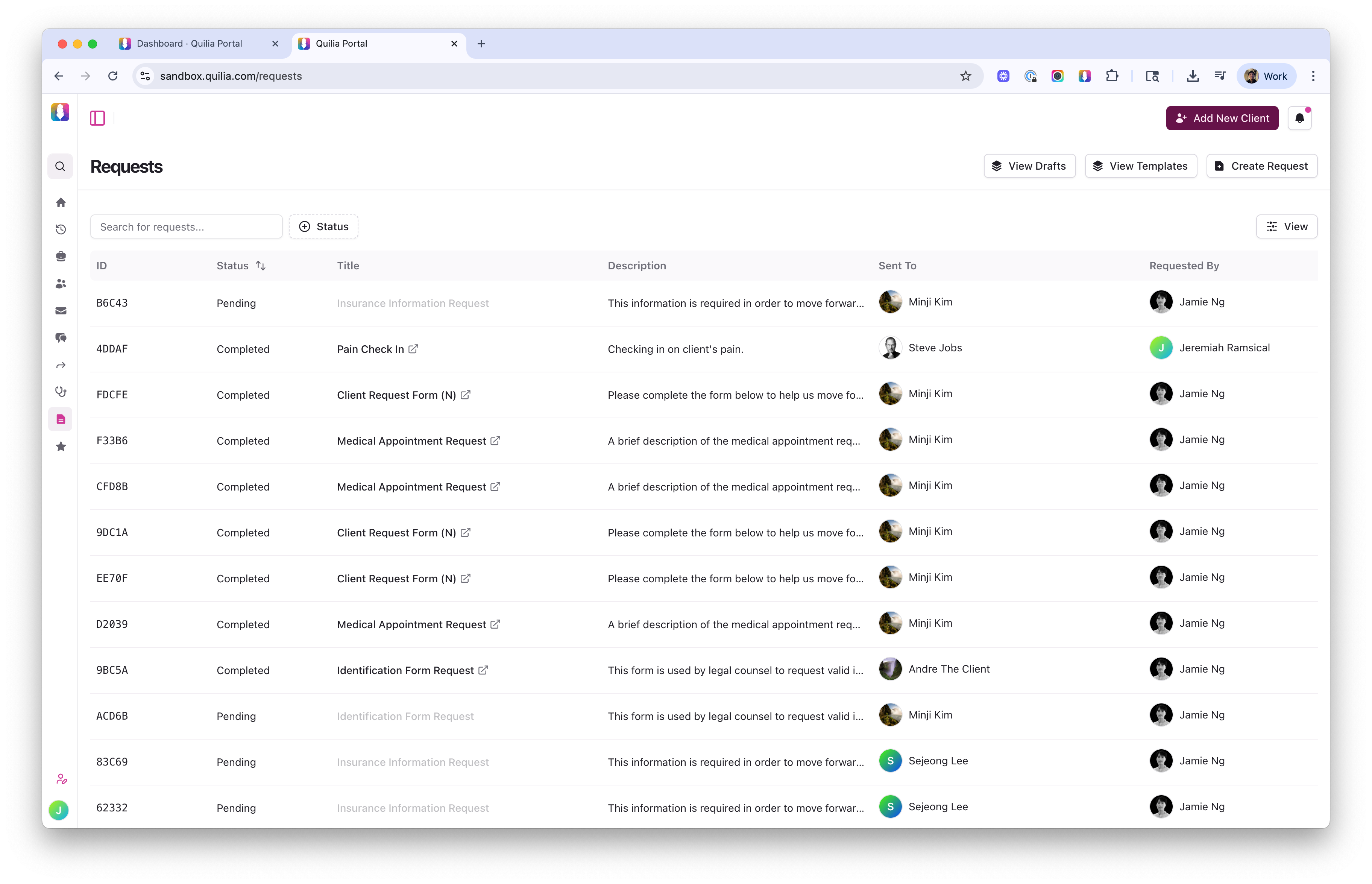
The Quilia Portal ‘Requests’ dashboard displays all client requests in one place — letting staff monitor pending and completed submissions with clear visibility across cases. Why it matters: Visibility across every open request helps your team stay organized, manage deadlines, and avoid duplicate outreach.
Design Custom Forms in Minutes
Easily create digital versions of your firm’s most-used forms — from check-ins and questionnaires to interrogatories and discovery requests. Save them as templates and reuse them across future cases.
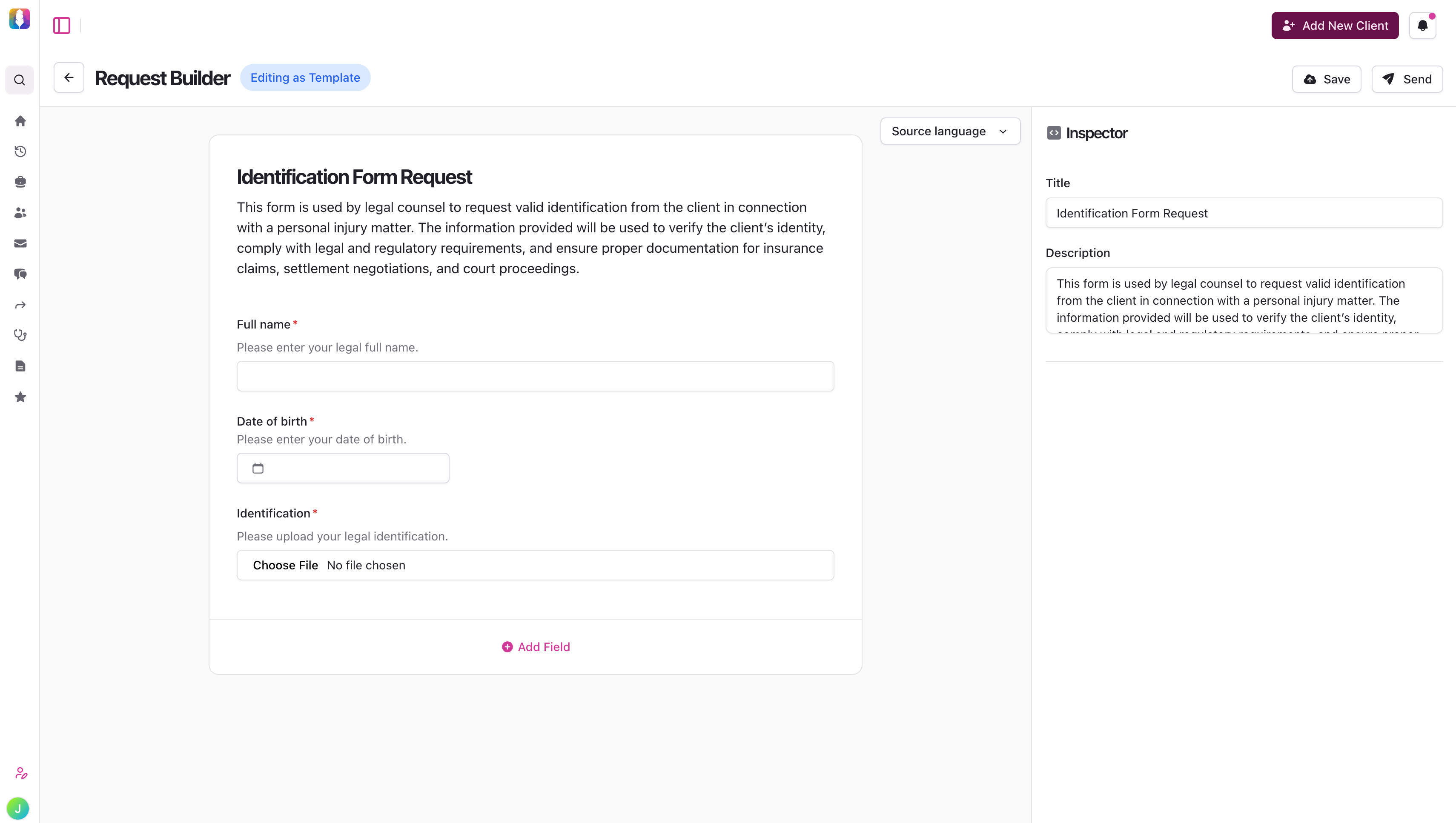
The Request Builder powers Quilia’s Requests feature — letting firms create and customize client forms for collecting case-critical information. Why it matters: Reusable templates cut down on repetitive admin work and keep your client data collection consistent.
Clients Respond Instantly From Their Phone
Clients get a push notification, open the Quilia app, and complete everything right from their phone. No printing or scanning — just tap, fill, and submit.
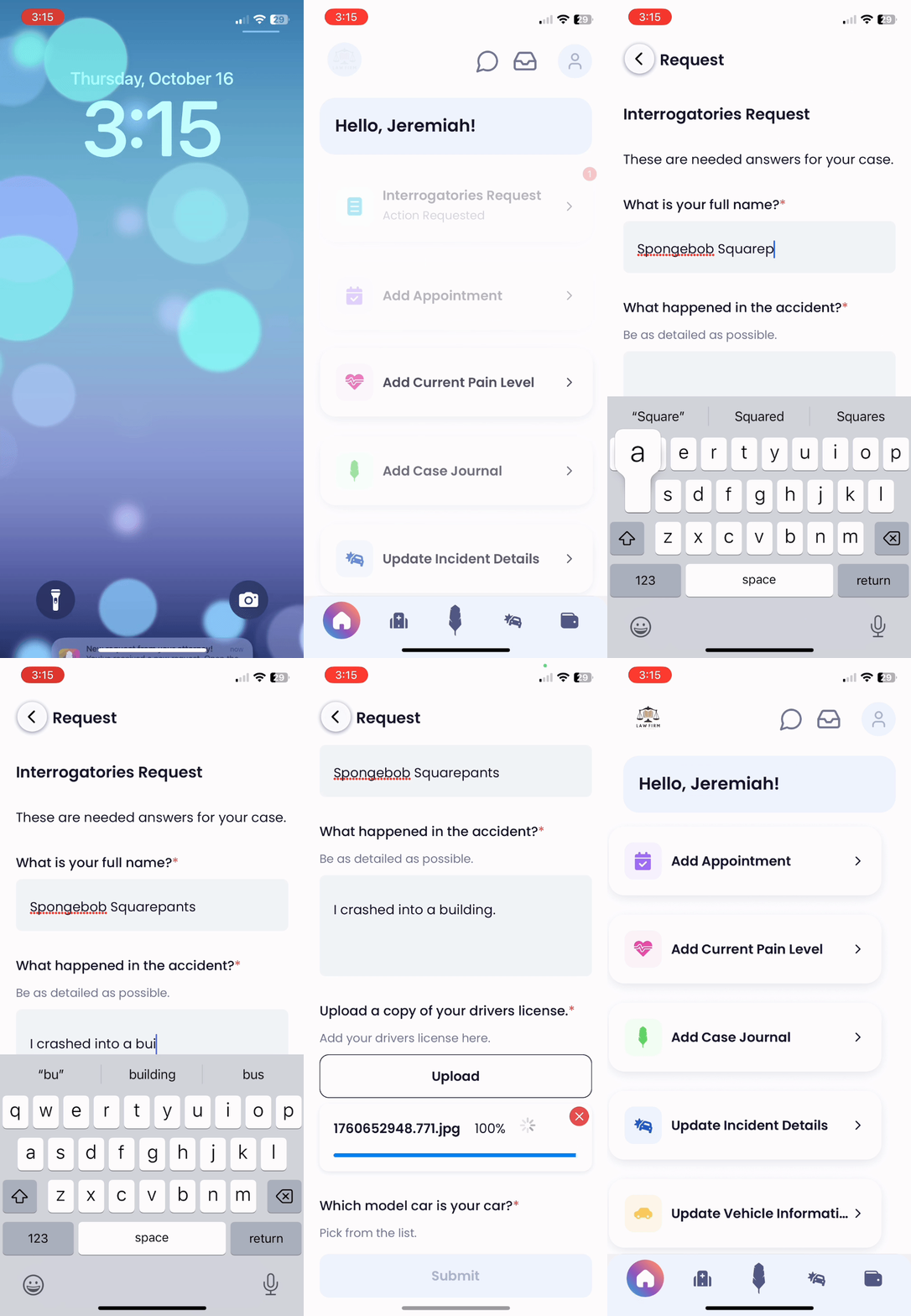
Clients receive Quilia requests as mobile notifications — enabling fast, frictionless form completion right from their phone. Why it matters: Faster client responses mean your team can move cases forward without waiting on follow-ups or lost attachments.
Things To Keep In Mind
-
Templates can be saved and reused across future cases
-
Notifications help clients respond faster
-
Responses sync instantly back to your firm's portal and CMS
What's Next in Quilia
We’re adding in-app signatures — making it even easier for clients to sign and return documents directly through the Quilia app.
No downloads, no printing — just quick, secure signatures that appear back into your case management system.
iOSAndroidIntegrationsAttorney PortalBy Jeremiah Ramiscal
-
CaseChat: Real-Time Translation & Activity Logs
This update adds real-time translation, a redesigned chat interface, and more reliable notifications to CaseChat. Your team can now communicate with clients in their preferred language directly within the app.
Key Updates in This Version
Real-Time Translation
Now your team can communicate seamlessly with clients in their preferred language, no matter what they speak.
-
Instantly translates client messages into your chosen language
-
Smart detection automatically identifies and routes different languages
-
Staff and clients can set their language preferences once and stay consistent
Why it matters: Personal injury firms serve diverse communities. With real-time translation, your team can build trust and accuracy from the very first message — without hiring interpreters or juggling external tools.
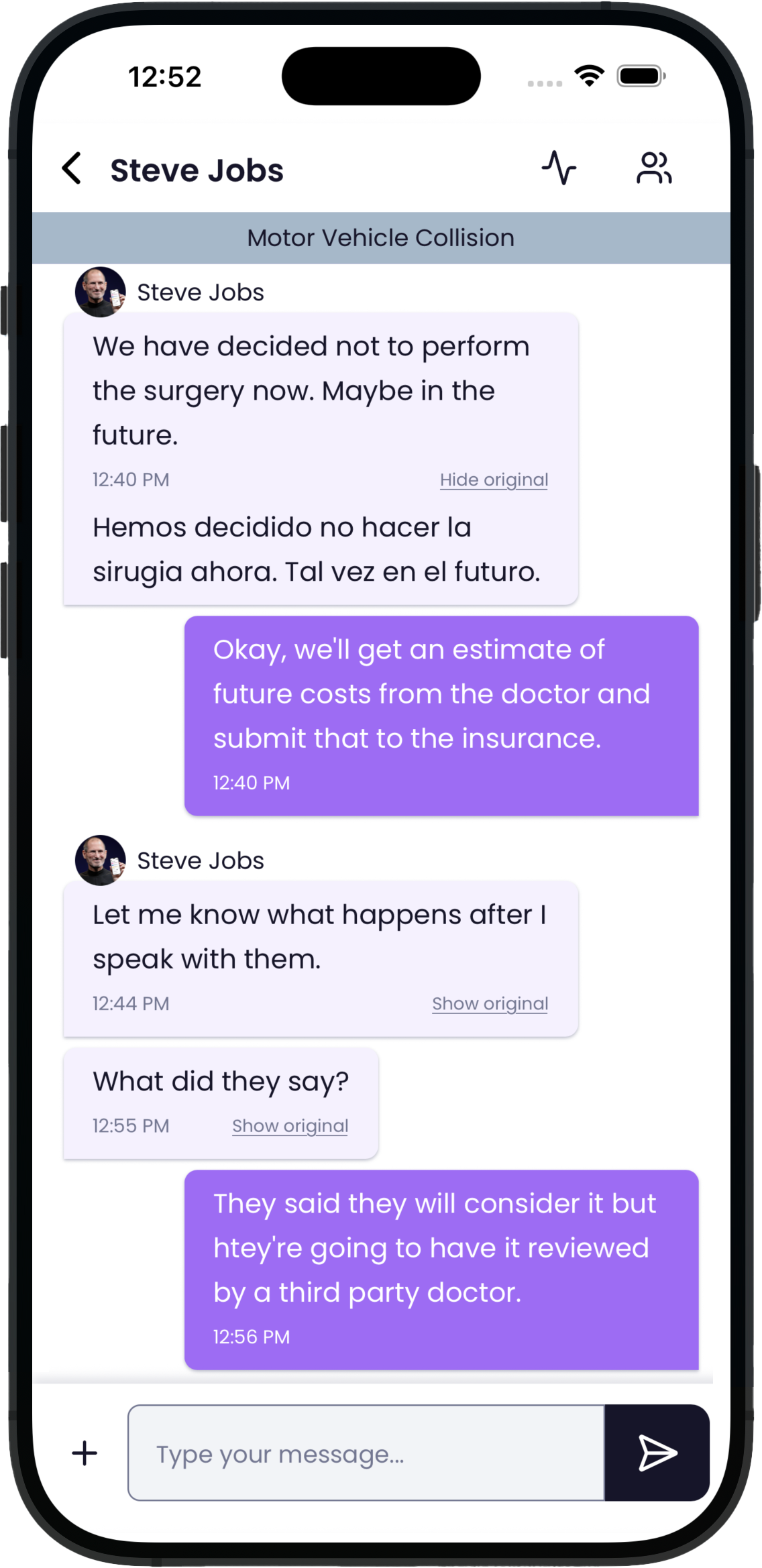
CaseConnect mobile chat view — enabling clear, secure communication between attorneys and clients directly within the Quilia app. A Modern Chat Experience
CaseChat has been redesigned to look and feel more intuitive, whether you're at your desk or on the go.
-
Cleaner layout with clearer message organization
-
Streamlined file sharing for faster document handoff
-
Responsive design optimized for mobile and desktop
📌 CaseChat is available wherever you work best — in the Quilia Portal, through the CaseConnect Chrome extension, or via the attorney login on our mobile app.
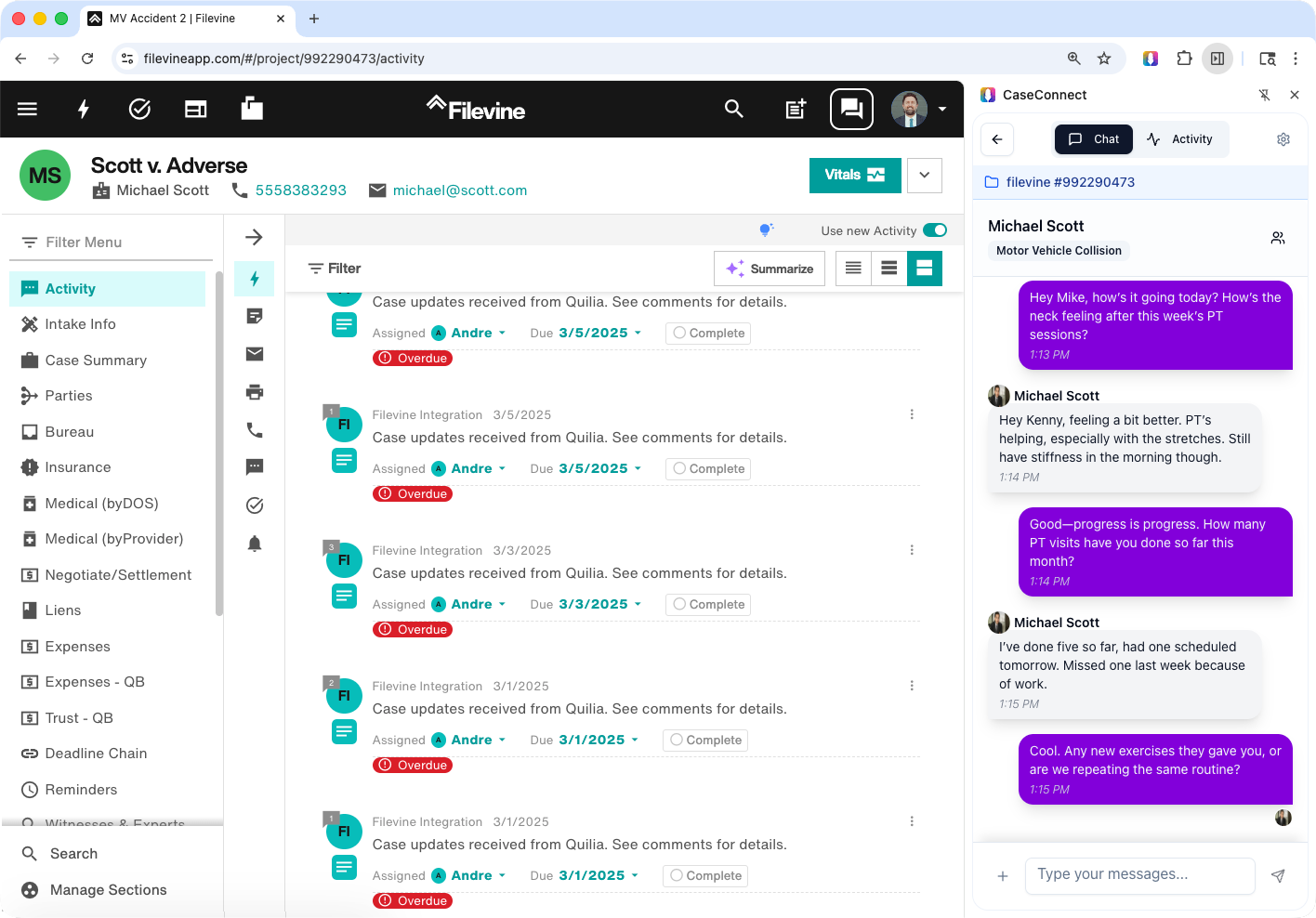
CaseConnect alongside CMS (Filevine pictured) — enabling attorneys to manage case updates and chat with clients in real time, all within one workspace. Why it matters: A faster, cleaner interface means less time digging for messages and more time focused on the client.
CaseChat Activity Log
Stay fully up to date by checking the Activity Log from CaseChat.
-
See every client action in one timeline — from messages to uploads
-
Track read receipts so you know when clients have viewed your updates
-
Keep case communication organized and easy to review
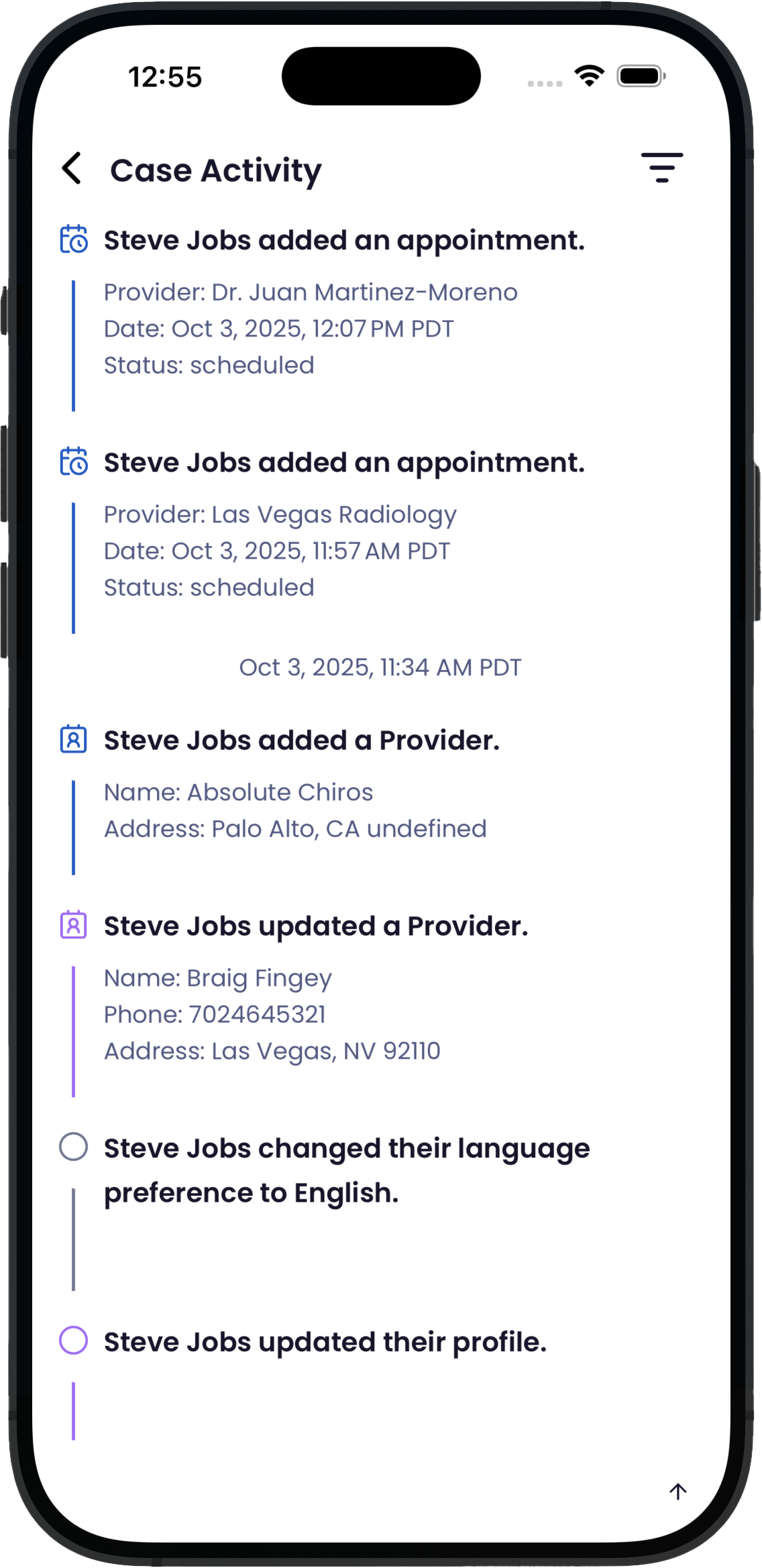
Case Activity screen in Quilia — giving attorneys real-time visibility into client actions, updates, and case progress right from the mobile app. Why it matters: The Activity Feed gives your team complete visibility into client communication, so nothing gets overlooked.
Other Enhancements
-
Faster chat loading and smoother performance
-
Recent messages always appear at the top of each conversation
-
Attachments now open reliably across all devices
-
Added a search bar to the attorney login on the app for easy client-message look up
What's Next in Quilia
We're working on new features to give your firm even more flexibility:
Requests — Custom, On-the-Spot Forms
-
Digitize any paper form your staff currently uses
-
Instantly request documents, updates, or details directly in Quilia
-
Keep client responses organized, case-ready, and tied to the matter at hand
📌 Update: Custom Requests launched in October 2025. See Custom Requests Are Here for details.
Attorney PortaliOSAndroidChrome ExtBy Jeremiah Ramiscal
-
AI Summaries, SmartAdvocate Integration, and Faster Messaging
We’ve rolled out updates designed to save your firm time, improve client communication, and keep everyone on the same page. This release includes:
-
AI-powered case summaries for instant insights
-
SmartAdvocate integration to manage cases in one place
-
Improved phase messaging for faster, more reliable client updates
Key Updates in This Version
AI-Powered Case Summaries
See the most important case updates instantly — without searching through case files.
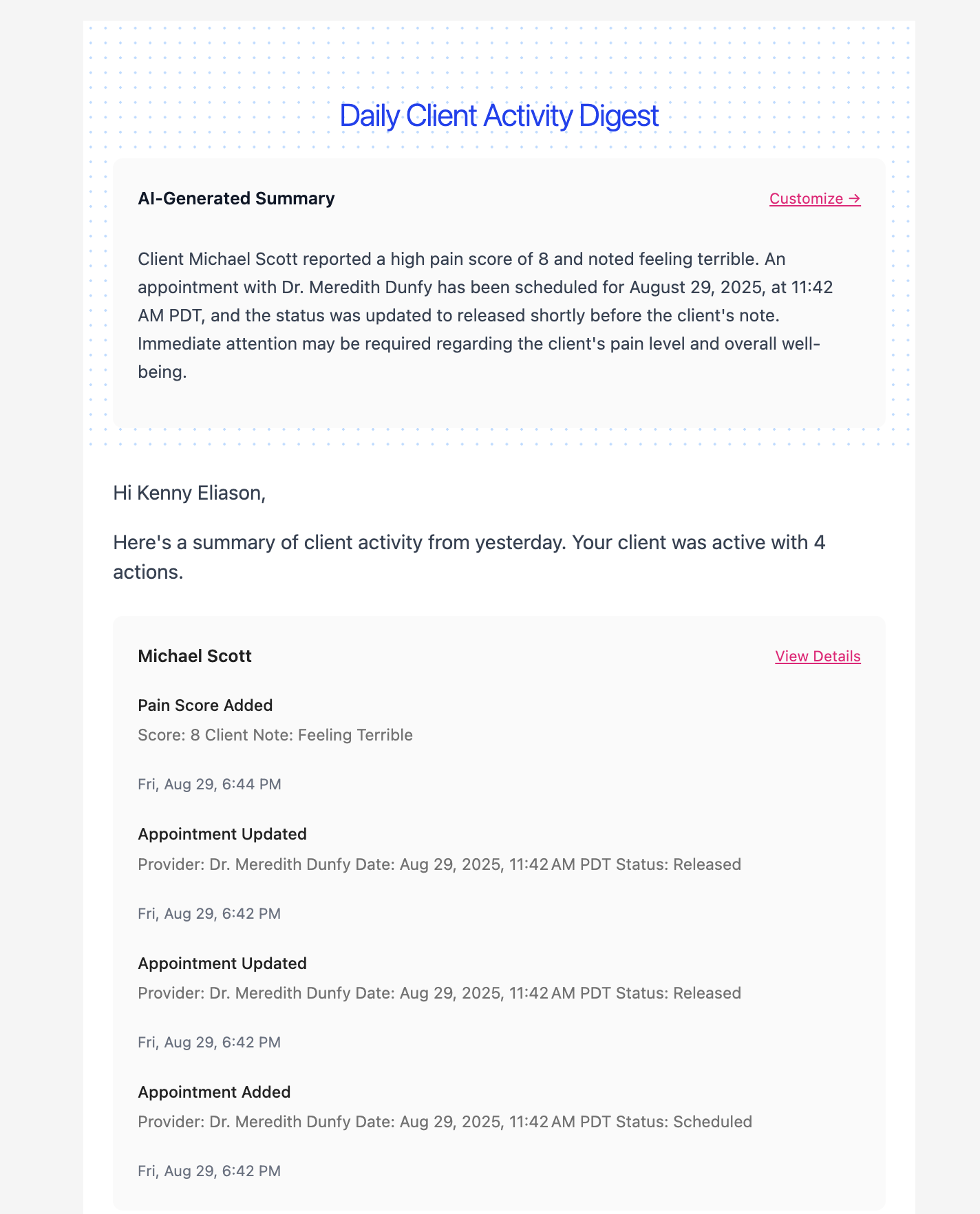
Example: AI-Powered Case Summary — Instantly see critical client updates, pain scores, and appointments without reading every note. Why it helps:
-
Instant insights into case progress
-
Spot key client activity at a glance
-
Spend more time on strategy, less on sorting info
📌 Tip: Head to Settings → Email Preferences → toggle on AI-Powered Summaries → click Save Preferences
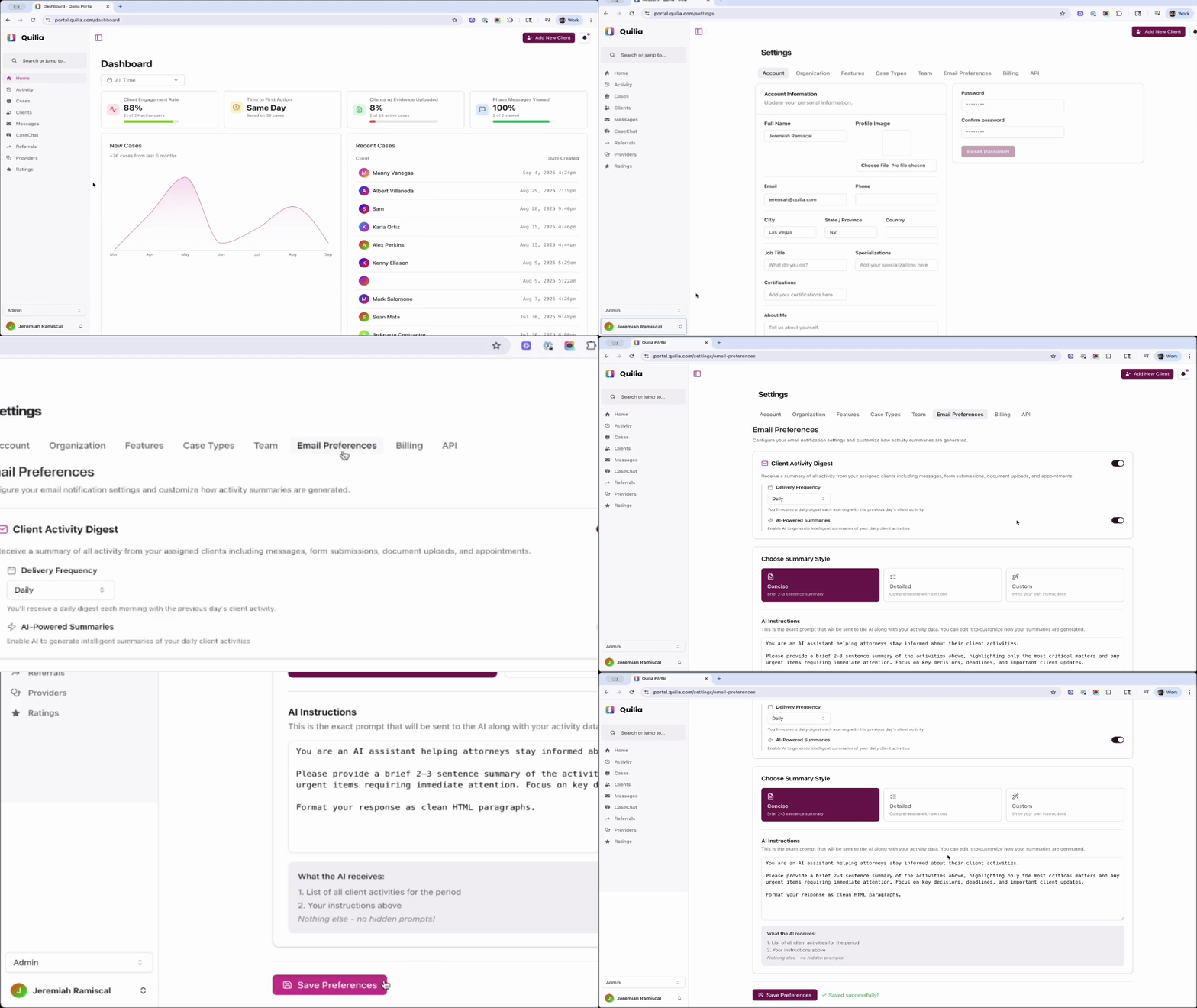
Quickly enable AI-powered summaries in your Quilia portal settings to get smarter, faster updates — all in just a few clicks. SmartAdvocate Integration
As previewed in our August release, Quilia now connects directly with SmartAdvocate.

Seamlessly integrate Quilia with SmartAdvocate to simplify case management and enhance client communication. What this means:
-
Manage cases and messages together in one place
-
Eliminate duplicate data entry
-
Reduce admin work and improve efficiency
New Integration Tools & Guides (For Partners)
For firms with custom-built case management systems, Quilia now supports secure API connections — that’s a safe way for different systems to talk to each other. We’ve also added step-by-step guides so your tech team or partners can easily build custom dashboards, reports, and firm-facing tools.
What's inside:
-
Step-by-step guides for connecting Quilia
-
API key support for secure, flexible integrations
-
Build custom dashboards, reports, and firm-facing tools
📌 Tip: Head to Settings → API → click View Documentation to access API documentation
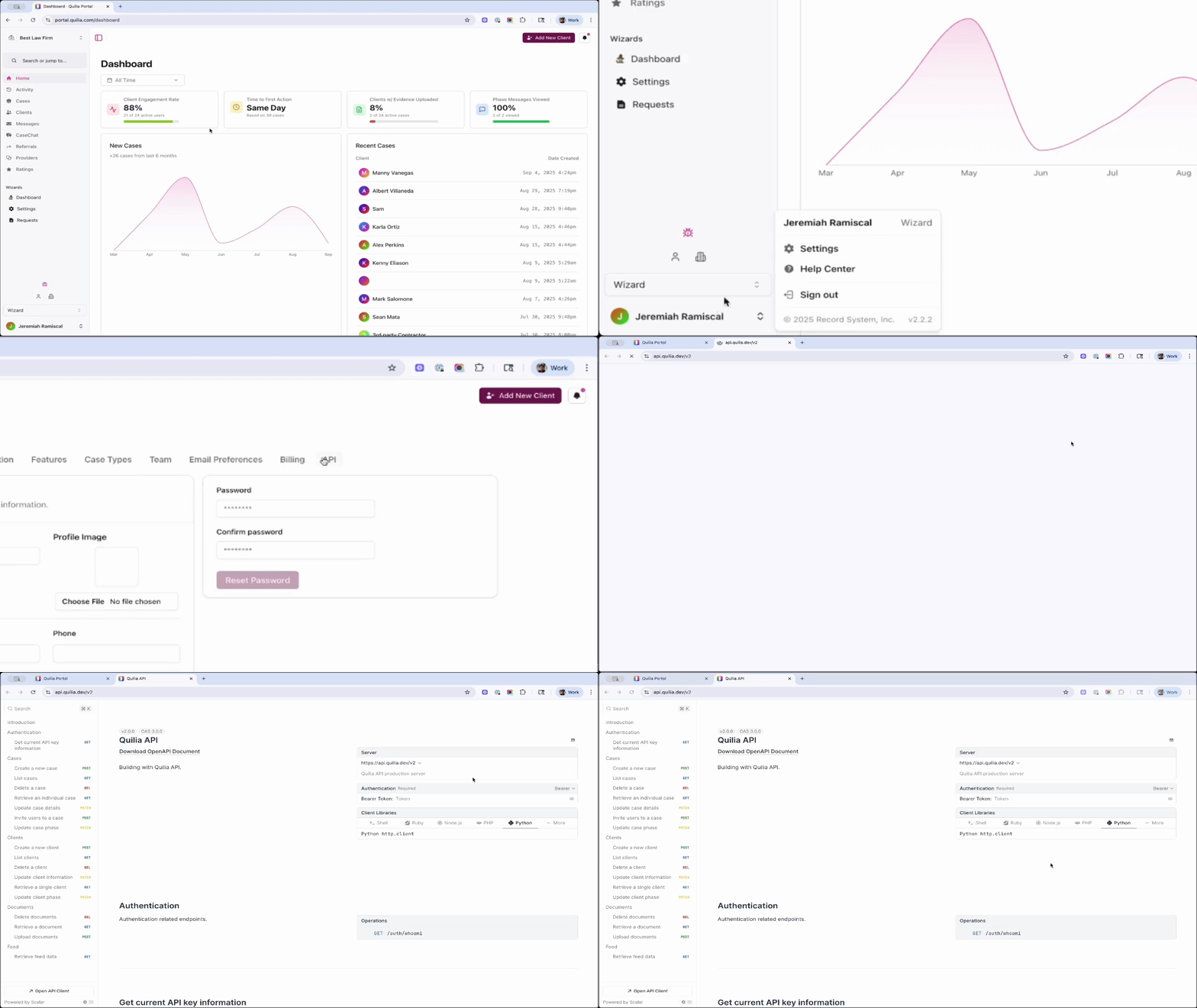
Quickly access Quilia’s API documentation in your portal settings — perfect for setting up custom integrations. Improved Phase Messages
Phase messages are now faster and more reliable, ensuring your clients receive timely, accurate updates every time.
Now you can count on:
-
Accurate status tracking for every message
-
Timely delivery of client updates
-
Better communication continuity across your firm
What's Next in Quilia
We’ve got something new in the works that takes client updates to the next level. Case Signal delivers smarter, more timely insights that help you stay ahead and fill in the gaps before they even appear. It’s coming soon — stay tuned.
We're also making it easier to manage clients with multiple cases — and cases with multiple clients. These updates give your team greater visibility into client activity and streamline your workflows.:
-
A case can have multiple clients (case members).
-
A client can belong to multiple cases.
These updates make it easier to manage cases with multiple clients and clients with multiple cases.
Attorney PortalIntegrationsBackendBy Jeremiah Ramiscal
-
Better Reporting, Faster Communication, and Performance Upgrades
This update adds a reporting dashboard with monthly trend charts, automated SMS follow-ups for client onboarding, and language detection for intake forms.
Key Updates in This Version
Enhanced Reporting Dashboard
Get a clearer view of case performance with our upgraded reporting dashboard:
-
Monthly trend charts to track case activity at a glance
-
Manager-level filtering to drill into team performance
-
Interactive charts that update as you filter data
Why it matters: Attorneys and managers can spot trends, monitor workloads, and make data-driven decisions without digging through spreadsheets.
📌 Tip: Log in to the Portal and you'll see the new Reporting Dashboard by scrolling to the bottom of the page.
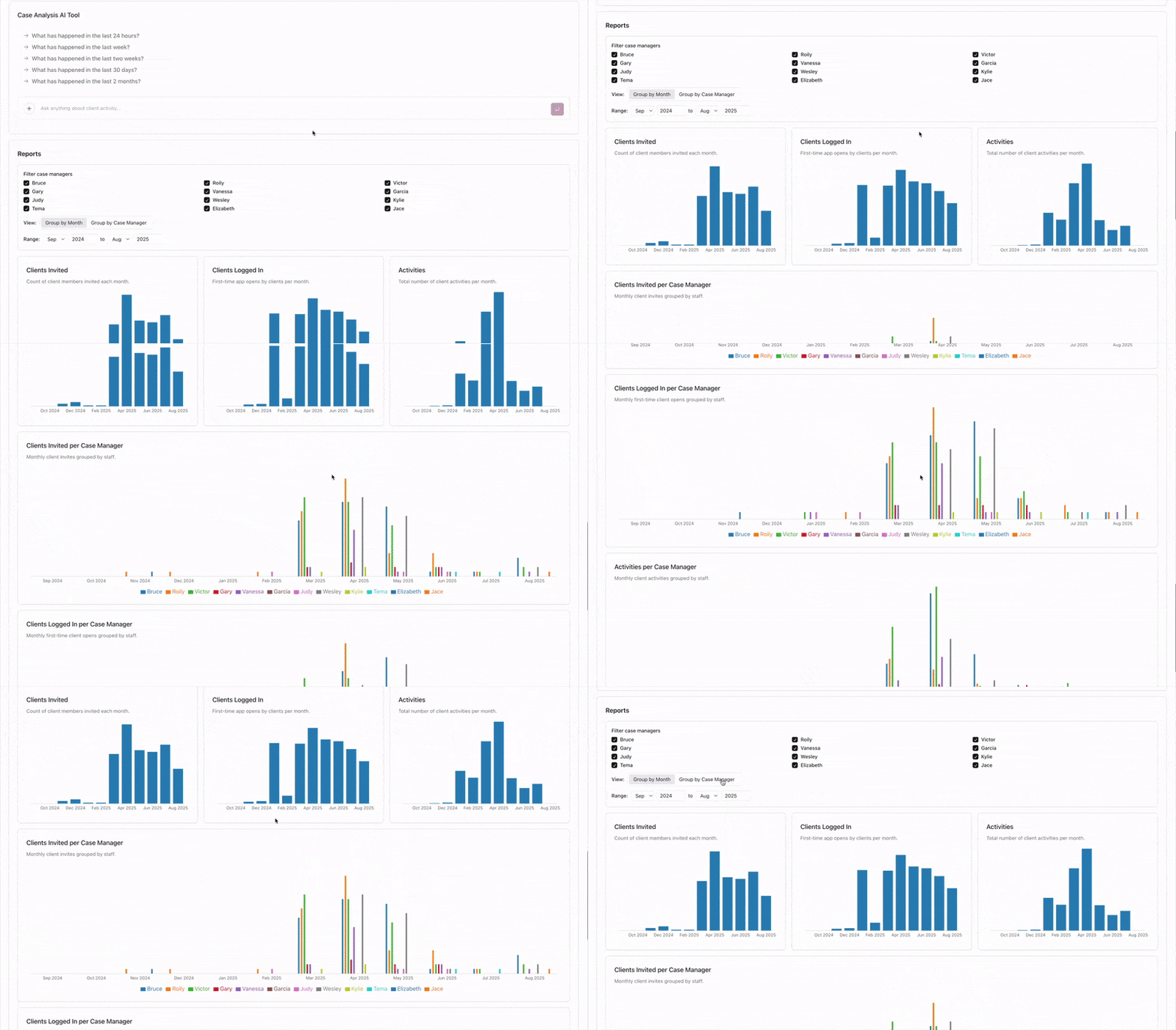
Dashboard showing Quilia's new Portal reporting dashboard with client activity reports, filters, and monthly metrics grouped by case managers Automated SMS Follow-up System
Our new intelligent SMS scheduling system automatically sends reminders to clients who haven’t completed intake steps after their initial invite.
-
Boosts client adoption rates from day one
-
Keeps case intake moving without manual follow-up
-
Reduces time spent chasing responses
Intelligent Language Detection
Our system now automatically detects the language used in intake forms to better support multilingual clients.
-
Automatically identifies client language preferences
-
Ensures clear, accurate communication from the very first interaction
Why it matters: The system handles language preferences automatically so staff don't need to configure anything manually.
Other Enhancements
-
Required Documents are now Requested Documents for a friendlier, client-first tone
-
Resolved refresh token issues for Smokeball for reliable syncing
-
Database and memory optimizations for a quicker, more responsive Portal experience
What’s Next in Quilia
We’re expanding Quilia’s flexibility with upcoming integrations and AI-powered tools designed to fit your existing workflows — from custom API connections to seamless SmartAdvocate syncing and smarter client activity summaries.
AI-Powered Client Activity Summaries
For firms using Client Activity Digest emails, staying on top of client updates just got easier.
-
Get a concise AI-generated summary of client activity each morning
-
Spot the most critical updates without scanning long lists
-
Keep personal injury cases moving with faster insights and less manual work
Public API Access
Soon, firms with custom in-house case management systems will be able to integrate directly with Quilia.
-
Seamlessly connect your existing workflows
-
Keep case and client data in sync automatically
-
Reduce manual updates and duplicate entry
SmartAdvocate Integration
For firms using SmartAdvocate, syncing case data is about to get easier.
-
Automatically import cases, clients, and staff details into Quilia
-
Keep case progression updates aligned in real time
-
Create a unified platform for client communication and case tracking
📌 Update: SmartAdvocate integration launched in September 2025. See AI Summaries, SmartAdvocate Integration, and Faster Messaging for details.
Attorney PortalBy Jeremiah Ramiscal
-
Pain Score Chart, Better Documentation, and Smarter Follow-ups
This update adds a Pain Score Chart for tracking client recovery, witness photo uploads, automated SMS reminders, and real-time case phase syncing from Neos.
Key Updates in This Version
Pain Score Chart for Personal Injury Cases
Clients can now log their daily pain levels (0–10) in the Quilia app, creating a clear, visual timeline of recovery that shows:
-
Pain trends over time
-
Peaks and improvements tied to treatment milestones
-
Visual context that strengthens demand packages and case narratives
Why it matters: Attorneys get time-stamped, client-entered pain data without manual check-ins. This helps build stronger medical narratives and supports more persuasive settlements.
📌 Tip: In the Quilia app, go to the Treatment tab and select Pain Tracking to view the chart.
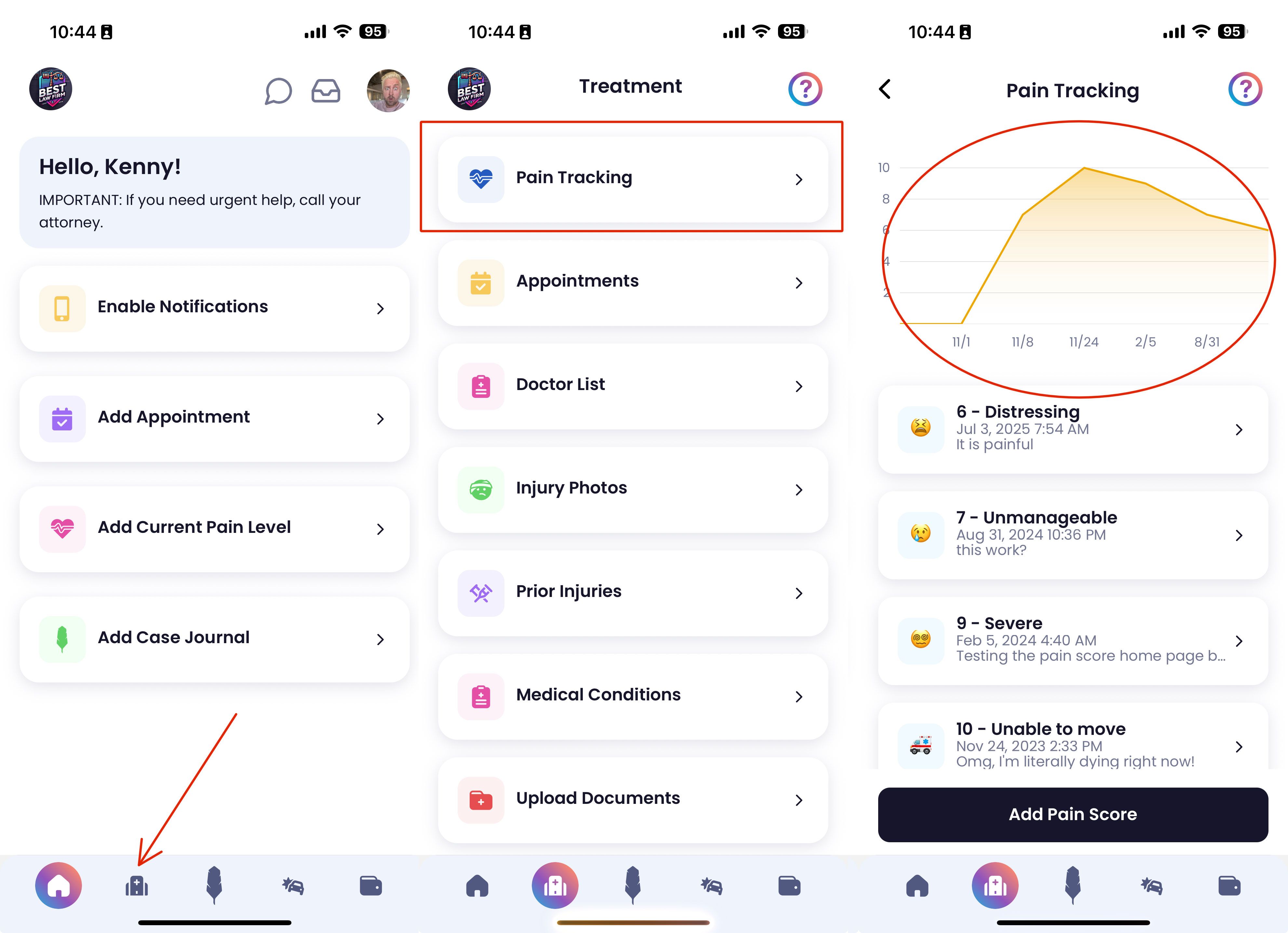
Pain Score Chart Witness & Other Driver Photo Uploads
Clients can now upload photos of witnesses or other drivers directly from their device into the Quilia app.
-
All visuals are stored in one organized location
-
Photos are instantly accessible for negotiations or litigation prep
-
Reduces reliance on email or text for critical evidence
Why it matters: Gathering supporting visuals no longer depends on the case manager chasing them down. Everything is organized, searchable, and case-ready.
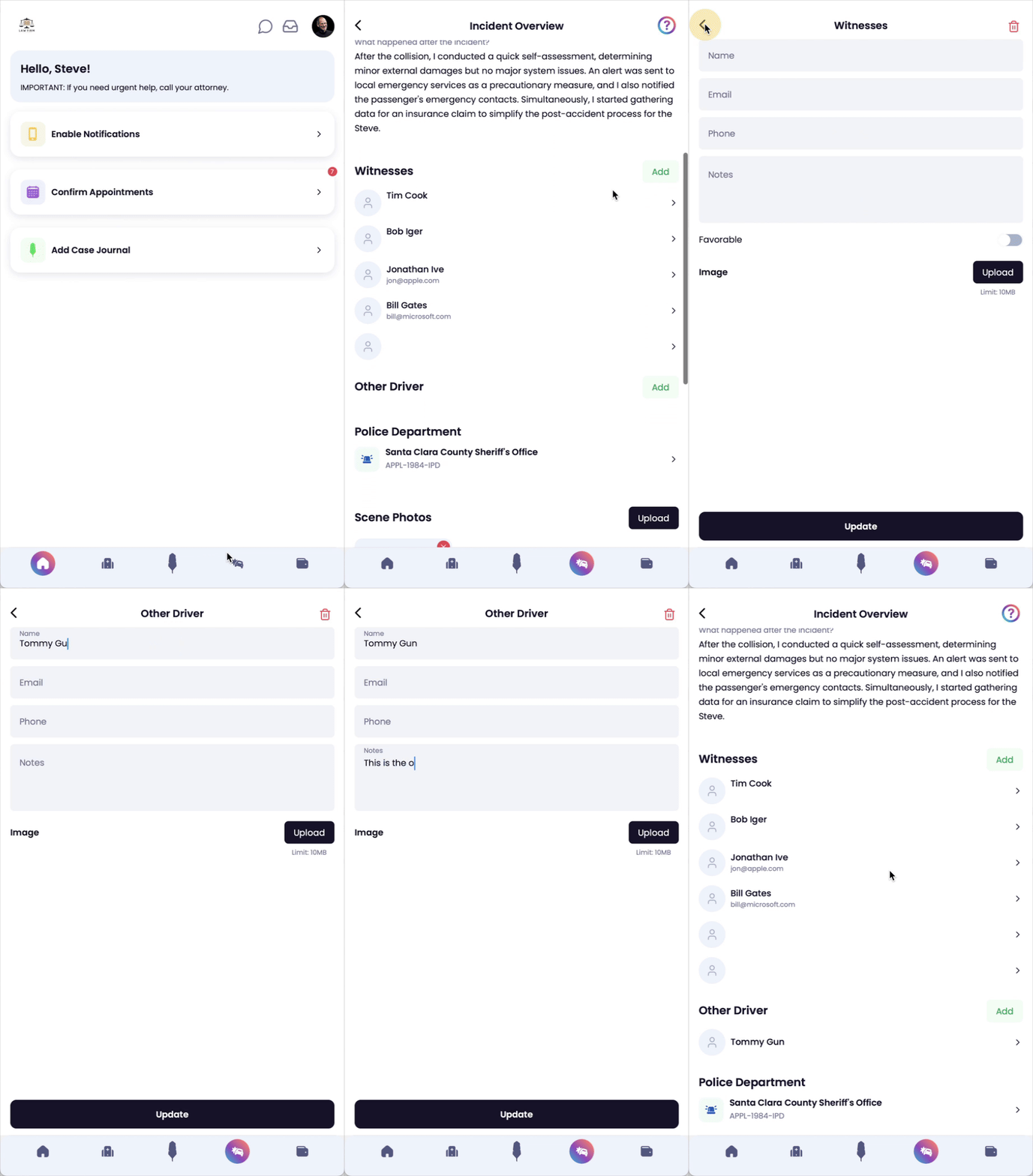
Adding Witness Photos in App Automated SMS Invitation Follow-Ups
Our new automated text reminders send follow-ups to clients who haven’t set up the app after the initial invite.
-
Boosts client adoption rates
-
Reduces time wasted on manual follow-up
-
Keeps your caseload moving without extra admin effort
Why it matters: You’ll see more clients engaged in the app from day one, which means more complete case files and fewer delays.
Neos Case Phase Sync
Phase changes in Neos now sync automatically into Quilia.
-
Automatic sync keeps both systems aligned in real-time
-
Manual sync option available for on-demand updates
Why it matters: You’ll never have to wonder if case statuses match between Neos and Quilia, making reporting and client updates more reliable.
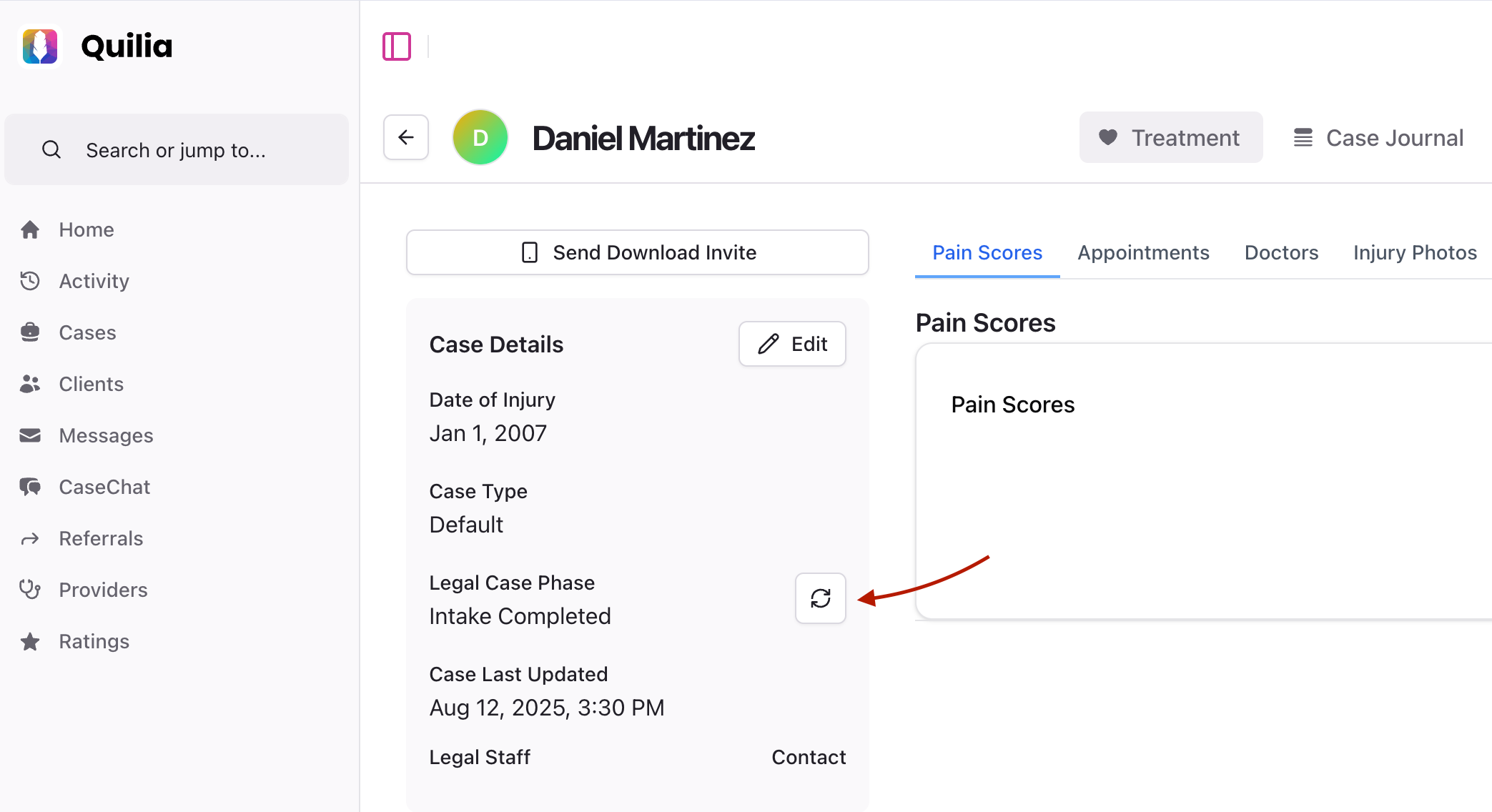
Neos Case Phases Stay in Sync Other Enhancements
-
Faster case pages in the attorney portal for smoother navigation
-
More reliable client activity digests with improved delivery
-
Enhanced provider search in the app for quicker lookups
What’s Next in Quilia
We’re building on this release with features that make personal injury case management software even more proactive and attorney-friendly.
Granular Analytics & Custom Dashboards Tailor your reporting view, track case manager performance in detail, and identify trends in client engagement.
Intelligent Appointment Reminders Clients will get automated nudges before appointments to prepare, plus post-appointment prompts to update their case.
More Reliable Notifications Switching from push notifications to on-device background tasks so critical updates are delivered without fail.
AI Summaries for Email Digests Personalize your daily email summaries to highlight the activity that matters most. Get a clear, AI-powered snapshot of client progress, case changes, and key follow-ups—so you know exactly where to focus your efforts each day.
📌 These updates are designed to give you deeper insight into your caseload and keep clients actively engaged—without adding extra work for your team.
Attorney PortaliOS v4.3.4Android v4.3.4By Jeremiah Ramiscal
-
Email Digests, Mobile Upgrades & More
This release brings two big upgrades to the Quilia Portal:
-
Client Activity Digests are delivered via email, so attorneys and staff can stay in the loop
-
Full mobile optimization of the attorney dashboard for case management on the go
We also officially launched our Partner Program, allowing you to earn referral rewards by introducing other firms to Quilia.
📬 Client Activity Digests
Stay informed without logging in. Quilia now sends daily or weekly digests with a summary of key updates from your assigned clients:
-
New messages
-
Form submissions
-
Document uploads
-
Scheduled appointments
-
And more — all in one place
You can adjust your preferences at any time under Portal Settings > Email Notifications.
📱 Mobile Dashboard Optimizations
The attorney's view in the Quilia Portal now works beautifully on phones and tablets.
-
Simplified navigation for mobile
-
Touch-friendly buttons and forms
-
Responsive layouts on every screen
🧠 Pro tip: Law firm team members can also log in using the Quilia mobile app for easy, on-the-go access.
🔗 Smokeball Integration (For Partners)
Our Smokeball integration is now fully live.
Firms using Smokeball can now:
-
Create cases and clients automatically from new matters
-
Sync case stage updates in real time
-
Upload documents directly into Smokeball
-
Send client activity from Quilia to the Smokeball case file
Have a firm in mind? Let them know we’re integrated.
🤝 Partner Program Now Live
Love Quilia? Now you can share it — and get paid.
Join the Quilia Partner Program and earn a 40% referral fee on your first 10 referrals. Send other firms our way and help them upgrade their client experience.
🛠 Other Enhancements
-
Improved case import reliability
-
Support for multiple open cases per client
-
Cleaner case types and imports (especially for Neos users)
-
Expanded admin tools for multi-location firms
📈 What’s Coming Soon
We’re rolling out additional automation tools to help firms stay connected without extra effort. Coming soon:
-
Recurring treatment check-ins
-
Deadline alerts
-
Smart reminders based on case activity
These features will build on your existing preferences — no extra setup needed.
Attorney PortalMedical PortalIntegrationsBy Jeremiah Ramiscal
-
Case Referrals Launch 🤝 and Scheduled Mass Messaging
Version 4.3.3 is now live on iOS and Android. This update adds Case Referrals, Scheduled Mass Messaging, Post-Case Client Mode, notification fixes, and Android display improvements.
🚀 What’s New
Mobile screen showing a law firm’s contact info and a “Refer a Case or Get Help” button 🤝 Case Referrals – Turn Clients Into Advocates
Clients can now refer friends or family directly through the app by submitting contact info, case type, and incident details. Those referrals land right in your intake flow, so no one's left hanging and your team stays in control.
No more “Hey, my cousin needs help…” with nowhere to go. Now it’s built-in, fast, and professional.
🔗 Attorney Share Integration – Smart Routing, Live Now

Attorney Share Partners with Quilia Referrals just leveled up. With our new Attorney Share integration, if a client refers someone for a case type your firm doesn’t handle, we’ll instantly route that referral to a trusted attorney in the network.
-
Client submits a referral through the app
-
If it’s not your firm’s focus, we match them with a vetted attorney
-
The referred person gets help—fast, no dead ends, no follow-up needed
You get the benefits of expanded referrals without any admin drag. Your firm stays at the center of the relationship.
📅 Scheduled Mass Messaging – Stay Ahead of the Curve
Building on Mass Messaging from our June release, you can now schedule firm-wide messages to go out at a set time—no manual follow-up needed.
Use it to:
-
Announce office closures for holidays, events, or weather
-
Share firm-wide updates or policy changes
-
Notify clients during system maintenance or downtime
It’s like a digital receptionist that never sleeps—clear, proactive communication, handled automatically.
Mobile screen showing post-case view with firm info and contact options in the Quilia client app 🧾 Post-Case Client Mode – Keep the Relationship Going
When a client’s case is marked closed, the app now transitions into a branded digital business card for your firm.
Clients can:
-
Refer friends and family using the same built-in flow
-
Stay subscribed to newsletters and firm updates
-
Keep your contact info handy for future needs
Your firm stays top of mind—no separate tool, no extra follow-up needed.
🔧 Bug Fixes – Smoother Notification Setup
iOS Notification Setup Resolved an issue where the “Enable Notifications” button could freeze during setup. Notification preferences now work seamlessly across all iOS versions.
Notification Badge Fix Fixed lingering badge counts that made it seem like there were unread messages. Badge numbers now match reality.
🌍 International Enhancements
-
Expanded translation support for English, Spanish, Korean, Thai, Simplified Chinese, and Traditional Chinese
-
Improved edge-to-edge display support on Android for a cleaner, more consistent visual experience
🛠️ Technical Improvements
Android Layout Upgrades Edge-to-edge compatibility now provides a more modern, polished app feel across Android devices.
Notification System Overhaul Strengthened our notification infrastructure—improving current reliability and laying the groundwork for future background alerts and automated client messaging.
📈 What’s Next
Now that Attorney Share integration is live, we’re focused on features that deepen client relationships and help your firm stay connected at scale.
Coming Soon:
- Automated, Event-Based Messaging Send the right message at the right time—like a 60-day check-in after onboarding, or a birthday message that feels personal without any manual work.
These updates help you turn one great case into many—without adding to your team’s workload.
Attorney PortaliOS v4.3.3Android v4.3.3By Jeremiah Ramiscal
-
First OTA Production Release & Mass Messaging Launch 🚀
First Over-the-Air Production Release
Quilia version 4.3.2 marks the first production feature shipped via over-the-air (OTA) deployment, bypassing app store review delays. This release also introduces Mass Messaging for law firms.
Quilia’s first over-the-air (OTA) release in production—no app store delay required. Shipped with mass messaging for law firms. 📢 New Feature: Mass Messaging for Law Firms
Say hello to Mass Messaging, a powerful way for firms to broadcast updates to all active clients—ideal for office closures, emergencies, or just staying ahead of the “what’s going on with my case?” emails.
Built from feedback by Jordan at Dubo Law, this feature lets attorneys and staff:
-
Send firm-wide announcements instantly
-
Deliver messages straight into each client’s Quilia inbox
-
Keep clients informed even when the office is closed or slammed
Bottom line: better communication, less one-off follow-up chaos.
🛠️ Under the Hood: Technical Wins
✅ First OTA Production Release
We’re officially live with OTA deployment, meaning updates now go directly to users without needing to push a new app version. That means faster delivery of fixes and features—just like this one.
🔧 Build Improvements (v4.3.3)
-
Dual builds for production + dev environments
-
Fixed iOS notification setup quirks
-
Improved Android edge-to-edge UI support
-
Early foundations laid for future background notification support
Dev builds are now posted to our GitHub and can be installed alongside the live app for seamless testing. No more uninstalling, no more switching—just test what’s next while keeping what’s live.
🔭 What’s Coming Next
We're laying the groundwork for a case referral system that lets clients refer friends or request help right in the app. It'll include:
-
Tight integration with Attorney Share
-
Smart email workflows so firms and clients stay in sync
-
A clean, professional experience from start to finish
This is the first step toward a referral engine that grows your client base from within—powered by trust and word-of-mouth, not just ads.
📌 Update: Case Referrals launched in July 2025. See Case Referrals Launch and Scheduled Mass Messaging for details.
Attorney PortaliOS v4.3.2Android v4.3.2By Jeremiah Ramiscal
-
Multi-Plaintiff Cases, Medical Tracker & Vehicle Storage
-
Multi-Plaintiff Case Handling: Introduced the ability for cases to have multiple plaintiff users connected, enhancing collaboration and case management for complex situations.
-
Medical Conditions Tracker: Launched a new feature for users to track and manage their medical conditions within the app, contributing to a holistic view of their health journey in relation to their case.
-
Vehicle Storage Option: Added a new option for users to securely store and manage information about their vehicles, streamlining case-related asset management.
-
Law Firm to Client One-Directional Messages: Implemented a feature allowing attorneys or staff to send messages to a client without enabling a response through the app, facilitating essential communication while respecting professional boundaries.
-
Multiple Employer Tracking: Added functionality for users to track multiple employers, aiding in employment history management within personal injury cases.
-
Enhanced Date Format Handling: (Note: Included for consistency but removed based on previous instruction)
-
Improved Spanish Translations: (Note: Included for consistency but removed based on previous instruction)
-
User Time Zone Tracking: (Note: Included for consistency but removed based on previous instruction)
iOS v2.2.0Android v2.2.0By Kenny Eliason
-
Avatar Uploads, Video Support & API Upgrades
-
Enhanced App Functionality: Significant updates to the Sign-in, Accidents, Daily Record, and Profile screens for a smoother user experience.
-
Improved Database and API: Upgraded our Supabase database and API for better performance and security.
-
Streamlined Backend: Cleaned up old files and codes for a more efficient app backend.
-
Pain Scores and Treatment Tracking: Restored functionality for PainScoresScreen and updated treatment screens with new API.
-
User Interface Enhancements: Fixed display issues and updated user interface components for better navigation and visual appeal.
-
Advanced Time and Date Handling: Corrected time display issues and introduced better date and time management in the app.
-
New Features: Added avatar upload, birthdate input, and enhanced PDF generation and download functionalities.
-
Video Upload Re-enabled: Now you can upload videos again, with improved handling and display.
-
Organizational Information Display: Updated to show organization information more effectively.
-
Continuous Improvements: Numerous other fixes and refinements to ensure the app runs smoothly and efficiently.
Attorney PortaliOS v2.0.0Android v2.0.0By Kenny Eliason
-
Pain Score Emoji Updates & Help Modal Improvements
-
Help Modals Description Updates: We've improved the language in our help modals to make them shorter and more effective. This should make it easier for you to find the information you need.
-
Improved Pain Score Emojis: We've updated the emojis used for pain scores to better represent each level of pain. This should make it easier for you to accurately describe your pain level.
-
Sorted Pain Scores: When adding a new pain score, the options are now sorted from highest to lowest, making it easier for you to select the most accurate score.
-
Added Pain Description: We've added a description to the pain score selection element to help you better understand each level.
iOS v1.3.6Android v1.3.6By Kenny Eliason
-
Introducing Daily Record 📝
We've renamed the Impact Journal to "Daily Record" to better align with its purpose and make it more intuitive for you.
📋 Updates
-
Daily Record: The Impact Journal is now called "Daily Record."
-
UI Reordering: The buttons on the bottom navigation have been reordered for easier understanding.
-
Updated Instructions: We've updated instructions throughout the app for better clarity.
-
Data Entry Prioritization: Pain scores are now above appointments, and employment details are above missed times.
-
New Missing Time Option: Added "pain" as an option for reasons for missing time from work.
🛠️ Fixes
- Date Picker Fixed: Resolved an issue with the date picker in scheduling appointments, now allowing for future date and time selection.
iOS v1.3.5Android v1.3.5By Kenny Eliason
-
Wage Loss Tracking and Verification
We’ve added a new Wage Loss Tracking feature to help clients and attorneys document income lost from missed work due to injuries. This update makes it easier to track time off, keep accurate records, and generate verification letters.
Wage Loss Tracking 🕒💸
Missing work for appointments, attorney visits, or clinic visits can have a major financial impact. Now you can log those details directly in the app.
Features include:
-
Reasons for Missing Work: Choose from appointment, attorney visit, or clinic visit.
-
Hours Missed: Enter the number of hours missed (decimal format).
-
Add Notes: Include extra details if needed.
-
Date Selection: Pick the date the absence occurred.
-
Running Log: View all entries in one place.
-
Total Missed Time: See the total hours missed at the bottom of the log.
New Verification Tabs 📄
To strengthen wage loss claims, clients can now generate letters for both medical and employer verification.
-
Doctor Verification Letter: Have a doctor confirm that time off work was medically necessary.
-
Employer Verification Letter: Have an employer confirm missed time and calculate wage loss.
iOS v1.3.3Android v1.3.3By Kenny Eliason
-
Introducing "Impact Journal"
-
Based on valuable client feedback, we've renamed "Attorney Updates" to "Impact Journal."
-
The new name better encapsulates the feature's purpose: to help you document the effects of your injuries on your daily life.
-
Updated feature descriptions for enhanced clarity and understanding.
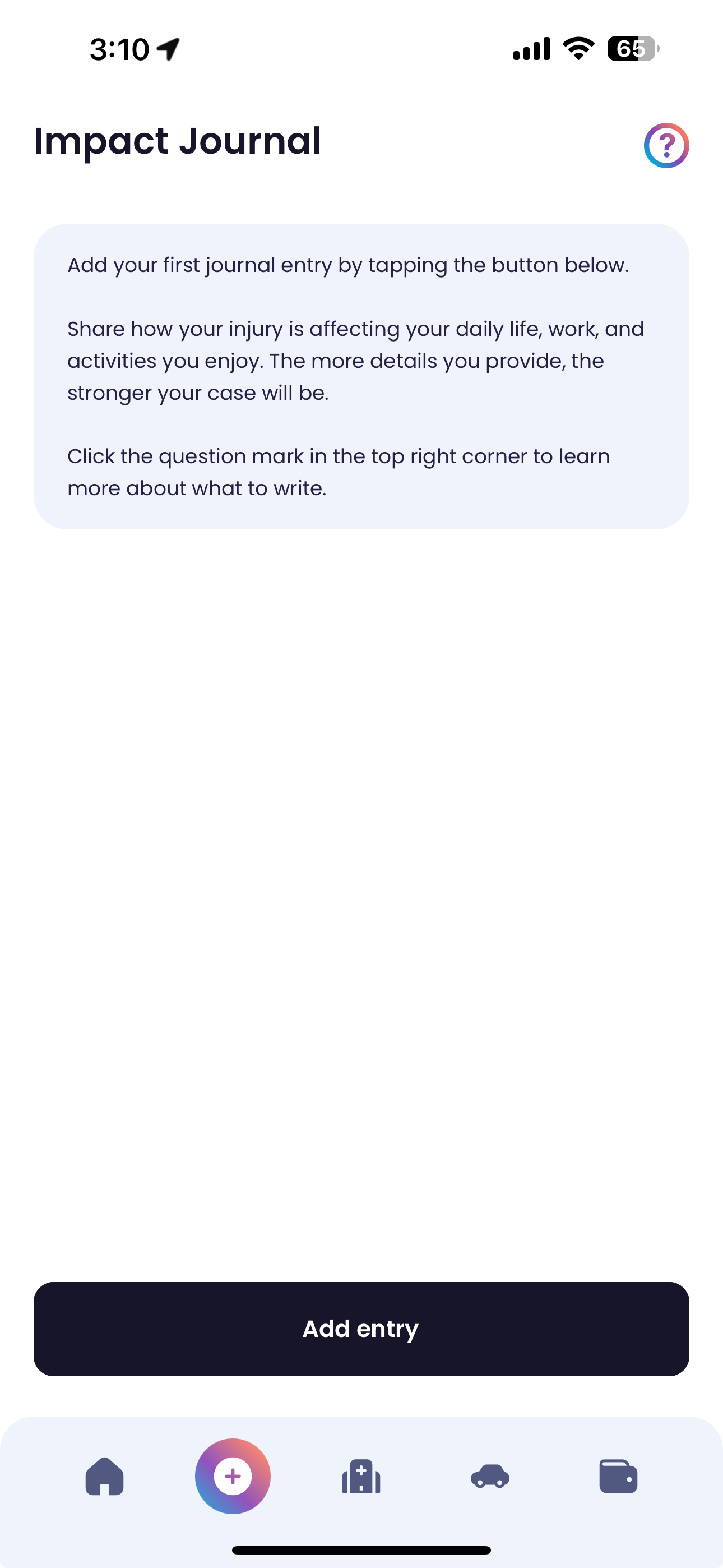
Quilia Impact Journal iOS v1.3.2Android v1.3.2By Kenny Eliason
-
Twitter to X Rename & UI Fixes
-
Attorney Update Overview Tab: Adjusted the gap to prevent text from overrunning into the right carrot.
-
Doctor Verification Button: Disabled the "doctor verification" button to avoid confusion, as it's not currently functional.
-
Twitter References: Updated all references to "Twitter" with "X (Twitter)" throughout the app.
iOS v1.3.1Android v1.3.1By Kenny Eliason
-