Automations That Know Your Cases
Say who, when, what, and how. Quilia runs it forever.
Your marketing list is not a spreadsheet you maintain. It is your caseload, and Quilia already knows every case in it: the status, the phase, the case type, the language your client reads, the day the matter closed. Build one rule against that, and it runs itself.
Four questions. That's the whole thing.
No workflow canvas, no branching diagram. Answer four questions and it runs.
Who it goes to
Describe them instead of picking them: closed motor vehicle collision cases, or everyone sitting in Negotiating. Type it in plain English and Quilia builds the conditions, then shows you exactly how many clients match before you save.
When it fires
Count from any date the case already carries. The day it opened, the day it closed, the day the phase last moved, the day the client was invited, or their birthday. Then set the distance: nine months after, two weeks before, on the day itself.
What it does
Send a message, ask for a satisfaction score, or send one of your forms. Add as many as you want to the same rule.
How it reaches them
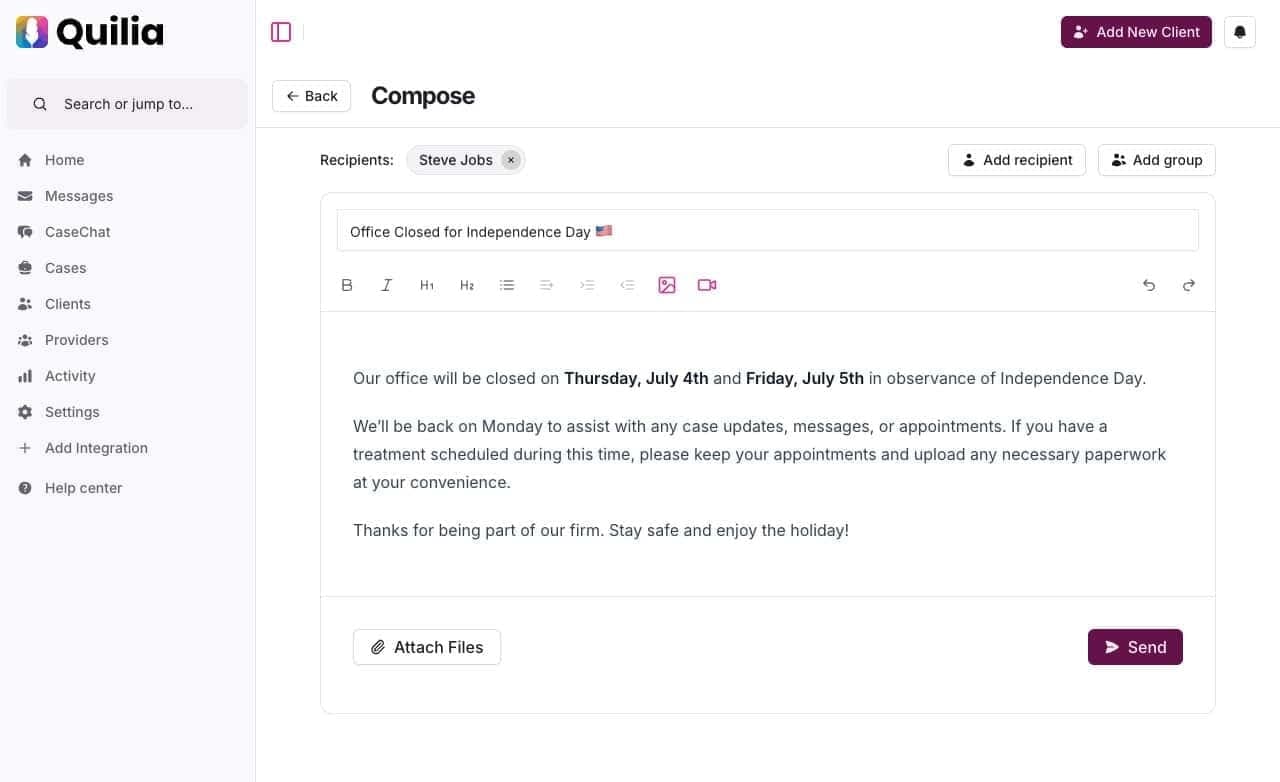
Push always, because the app is where the message lives. Then add a text or an email on top when it is worth the interruption. A holiday note and a signature request do not deserve the same reach.
Result: the follow-up you keep meaning to do, done every time
An Email Tool Knows Who Opened. Quilia Knows the Case.
That is the entire difference, and it is not a small one. Marketing platforms segment on what people did inside your emails. Quilia segments on what is happening in the matter.
A typical email platform
- Segments on opens, clicks, and tags you apply by hand
- You export, import, and scrub the list yourself
- It goes to an inbox, and competes with everything else there
- Email, and only email
- One language, unless you build a second campaign
- Knows nothing about the matter it is writing about
Quilia
- Segments on case status, phase, and case type
- The list maintains itself as cases move, because it stores the rule and not the names
- Push into an app your client already opened this week, plus a text or email on top when it warrants one
- Written once, delivered in the languages your clients read
- Counts from real case dates, so the timing is never guessed
Switching an automation on never messages your back catalog. Anyone whose date already passed is skipped, so "when a case closes, send this" waits for the next real closing instead of texting ten years of former clients at once.
What Firms Build First
Every one of these is a single rule, configured in a couple of minutes.
Ask for the review at the right moment
Ninety days after a case closes, thank the client and ask how you did. Score a 9 or 10 and they are asked for a Google review on the spot.
Stay in touch through a long treatment
Every 21 days on an open case, check in and ask how treatment is going. One interval, set once, running for as long as the matter does.
Explain the phase before they call about it
The day after a case moves to Negotiating, send the message explaining what happens next and how long it usually takes.
Collect intake without chasing it
Two weeks after a client is invited, send the form you always end up sending. Anyone already holding it unanswered is skipped.
Remember every birthday
One rule, every client, every year. The kind of thing that builds referrals and that nobody has time to do by hand.
Say it once, in every language
Write the English and generate the rest, then edit any translation directly. Clients you have no translation for get the English, never nothing.
Pause It. Stop It. Nothing Runs Away From You.
The reason a firm is willing to point one of these at four hundred clients.
Pause
Holds the queue exactly where it is, and tells you how many sends are waiting and when the first one is due before it does anything.
Stop
Cancels everything still scheduled. What has already gone out stays untouched, because that is the record of what your client was told.
You see the numbers before you commit, too: how many clients match, and how many of them actually carry the date you are counting from. A birthday rule aimed at 500 clients that can only reach 158 of them says so while you are building it, not afterwards in the send counts.
And All of This Was Already Running
Before you build a single rule of your own, Quilia is already handling the parts of client communication nobody should have to remember.
Smart invitations
A text with one tap to download, in your branding and your client’s language, with gentle follow-ups at 12 and 36 hours.
Always-on communication
Attorneys notified within 30 seconds of a new message, SMS follow-up if it goes unread, and two-way translation in 10+ languages.
Phase-based updates
When a case status changes in your case management system, the client hears about it without anyone remembering to tell them.
Intelligent document handling
AI reads what your client uploads, pulls out the key details, and files it back into the right folder in your CMS.
Smart re-engagement
Quiet clients get a nudge to keep documenting treatment, timed to their own timezone and stopped the moment they come back.
AI working in the background
Daily activity digests, session summaries, document classification, and evidence timelines, compiled while you sleep.
Your CMS Stays the Source of Truth
Every audience you build reads from case data that syncs automatically. Update your case management system once, and the rules you have written stay accurate on their own.
Supported integrations: Clio, Filevine, MyCase, Neos, Smokeball, SmartAdvocate, CasePeer, Litify, and more.
What syncs automatically: Case phases, client info, staff assignments, documents, and case metadata.
View All IntegrationsResults That Speak for Themselves
Industry data from the 2025 Clio Legal Trends Report shows growing firms use automation 2x more than stable firms and 3x more than shrinking firms.
Automations FAQs
Can I send messages to all my clients at once?
Yes. If you update a case phase in your CMS, Quilia automatically sends the related phase message to every connected client.
Do clients get both text and email invites?
Nope, just a text message with a magic link. That's all they need to get started.
How does Quilia communicate with clients?
Quilia primarily uses push notifications through the mobile app to communicate with clients. We also send text messages as a fallback for clients who don't have the app installed or have notifications disabled. This ensures clients always receive important updates about their case.
Can Quilia send automatic reminders to clients?
Yes. We send strategic reminders for things like medical appointments and even confirm if they went, so your staff doesn't have to chase them down.
Can I assign tasks or requests to clients?
Yes. We call them "requests." You can ask for documents, info, or anything else, and they'll see it as a to-do in the app.
How do I know when a client responds?
You'll get a notification in our Chrome extension or an email. Some CMS setups can also assign it directly to your team.
Can I delete a message after sending it?
Yes. You can delete it from the dashboard and the client won't be able to see it anymore.
Can I delay notifications after a phase change?
Yes. Phase messages are queued to send the following morning. That gives you time to make edits or changes without sending multiple alerts.
Can client messages be routed to specific team members?
Yes. You can set up routing so responses go to the right person based on team roles in your CMS or dashboard.
Can I see if a message hasn't been read yet?
Yes. Unread phase messages are clearly visible in your dashboard reporting.
How are case updates sent to clients?
Whenever a case phase changes in your CMS, Quilia automatically sends a prewritten message to the client. No extra typing, no manual push required.
Do clients get real-time notifications?
Yes. Updates are delivered instantly, so clients always know where their case stands without having to call your office.
Does this reduce client phone calls?
Big time. Automated updates cut down on repetitive check-ins, freeing up your team’s time while keeping clients in the loop.
How important are automated case updates in Quilia?
They’re solid and definitely useful—clients love staying in the loop without needing to call your office. But we don’t stop there. Case phases don’t change every day, so Quilia focuses on something even bigger: capturing client data in real time and delivering it to attorneys when it matters most. Automated updates are part of the package, not the whole story.
How is Quilia’s messaging different from Hona or Case Status?
Hona and Case Status lean heavily on phase-change notifications. Quilia includes those too, but we treat them as just one piece of the puzzle. Our messaging is tied into client data collection and case progress, so attorneys get updates that actually move the case forward—not just alerts for the sake of alerts. See our detailed comparisons at /compare/
Why not just use a platform built around notifications?
Phase notifications are helpful, but they don’t change often enough to drive real engagement on their own. Quilia goes further by combining automated updates with treatment tracking, requests, and real-time client data. That way clients stay informed and attorneys get actionable info that improves outcomes.